

What actually counts against the limit
The limit only measures business-initiated conversations, template messages you send to customers outside an open service window. Three clarifications save a lot of confusion:
- It counts unique customers, not messages. Sending one customer three templates in a day uses one slot, not three.
- It's a rolling 24 hours, not a calendar day. A send at 9 pm and another at 8 am the next morning fall inside the same window.
- Replies don't count. When a customer messages you first, everything you send back inside the 24-hour window is unlimited and free. A support operation answering ten thousand inbound chats a day uses zero of its messaging limit.
The limit applies per business phone number. If you run multiple WhatsApp numbers, each carries its own tier, though Meta increasingly evaluates quality across your whole business portfolio, so one bad number can hold back the rest.
The tier ladder: 250 to unlimited
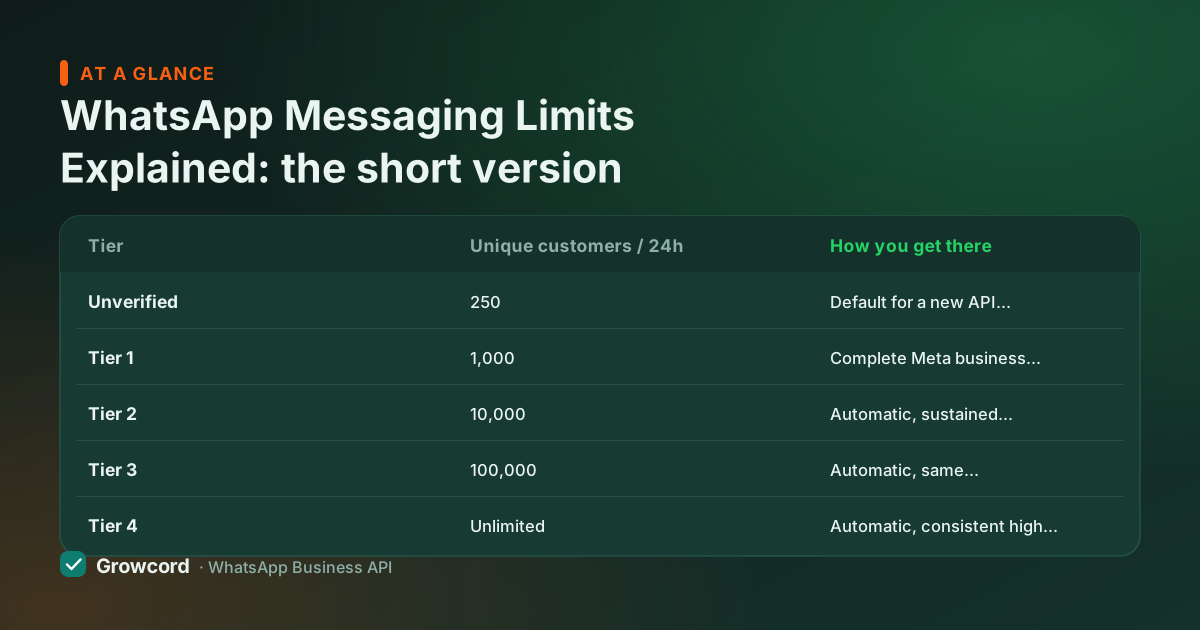
Meta doesn't publish an application form for higher tiers, there isn't one. Movement up the ladder is automatic and driven by two things: how much of your current limit you actually use, and whether your quality rating stays healthy while you use it. The table below shows the ladder as Meta documents it, checked August 2026.
WhatsApp messaging limit tiers
| Tier | Unique customers / 24h | How you get there |
|---|---|---|
Unverified | 250 | Default for a new API number before Meta business verification |
Tier 1 | 1,000 | Complete Meta business verification (business documents in Business Manager) |
Tier 2 | 10,000 | Automatic, sustained sending near your limit with medium/high quality |
Tier 3 | 100,000 | Automatic, same conditions, at Tier 2 volume |
Tier 4 | Unlimited | Automatic, consistent high volume, consistently good quality |
Unique customers you can initiate conversations with per rolling 24 hours. As documented by Meta, checked August 2026.
How to increase your WhatsApp messaging limit
There are only two levers, and both are boring on purpose.
First, finish business verification. Submitting your business documents (GST registration, incorporation certificate, or similar) in Meta Business Manager moves you from 250 to 1,000 immediately. This is the single biggest one-time jump available, and it's also a prerequisite for features like the verified badge, see our green tick guide.
Second, send real volume with good quality. As of August 2026, Meta's documented pattern is that a number which uses roughly half or more of its current limit over about a week, while holding a medium or high quality rating, gets upgraded automatically. Meta re-evaluates eligible numbers frequently, upgrades often land within days of hitting the volume threshold, with no request needed. In practice, businesses that broadcast to genuinely opted-in lists tend to move from 1,000 to 10,000 within a few weeks.
What doesn't work: emailing Meta support to ask nicely, buying "aged" numbers, or splitting one audience across many numbers to dodge the math. The system reads sending behaviour, and shortcuts read as risk.
Quality rating: the thing that actually decides
Your quality rating, shown as green (high), yellow (medium) or red (low) in WhatsApp Manager, is Meta's read on how recipients react to your messages. Blocks and spam reports drag it down; messages people read and reply to keep it healthy. It matters more than any other number you track, because it gates everything:
- A falling rating freezes tier upgrades; a red rating can cut your limit to a lower tier.
- Individual templates can be paused or disabled if enough recipients block after receiving them.
- Sustained low quality is the road to the account restrictions covered in our guide on why WhatsApp bans numbers.
The fixes are unglamorous: message people who opted in, make the first line worth reading, keep marketing frequency modest, honour STOP requests instantly, and segment so customers get messages relevant to them rather than everything you send.
Warming up a new number, safely
Complete Meta business verification before your first campaign, 250 to 1,000 in one step
Start with your warmest audience: recent buyers and people who opted in this month
Scale volume gradually, roughly doubling per send is a sensible pace, never 10x overnight
Watch delivered, read and block signals after every campaign before sending the next
Never import a purchased list, blocks from cold contacts sink the rating that controls your tier
Spread big sends across the day rather than one spike at 10 am
Messaging limits vs the 256 broadcast cap
People often mix up two unrelated limits. The 256-contact cap belongs to broadcast lists in the free WhatsApp Business app, a product restriction, per list, that also only delivers to people who saved your number.
The messaging tiers on this page belong to the Business API and are behavioural: they grow with you, and at Tier 2 you're already reaching 10,000 customers a day. The comparison in broadcast vs group and our broadcast software page cover the practical difference.
Watching your tier from the dashboard
In Growcord, campaign reports show delivered, read and reply counts per send, and the analytics dashboard surfaces your quality signals, so a problem shows up after one campaign instead of after a downgrade. Costs are two known numbers: the plan fee (Basic ₹299/month, ₹99 billed yearly) plus Meta's per-message fee at Meta's published rate with no markup, estimated before you confirm each campaign. Details on the pricing page.
Grow your sending tier the boring, reliable way
Free tier: 1 number and 50 conversations a month. Verify, warm up, and watch the limits rise on their own.
Start free, no card neededWhy Growcord
What you get here that you don't get elsewhere
Frequently asked questions
What is the messaging limit for a new WhatsApp API number?
As of August 2026, a brand-new number on the WhatsApp Business API can initiate conversations with 250 unique customers per rolling 24 hours. Completing Meta business verification lifts that to 1,000. From there, tiers of 10,000, 100,000 and unlimited are granted automatically as you send consistent volume with a medium or high quality rating.
How do I increase my WhatsApp messaging limit to 10,000?
Verify your business in Meta Business Manager to reach the 1,000 tier, then send real volume with good quality. Meta's documented pattern is that numbers using roughly half or more of their limit over about a week, while keeping a healthy quality rating, are upgraded automatically, there's no form to fill. Most businesses with genuinely opted-in lists reach 10,000 within a few weeks.
Do customer replies count against the messaging limit?
No. The limit only counts business-initiated conversations, templates you send to customers outside an open service window. When a customer messages you first, your replies inside the 24-hour window are unlimited and free, and don't touch the tier at all. High-volume support operations run comfortably on low tiers for exactly this reason.
What happens when I hit my messaging limit?
Attempts to start conversations with additional new customers fail until the rolling 24-hour window frees up capacity, Meta simply won't deliver templates beyond the cap. You can still reply to anyone who has messaged you. If you hit the ceiling regularly while quality stays good, that sustained usage is precisely what triggers Meta's automatic upgrade to the next tier.
Why did my messaging limit go down?
A downgrade almost always follows a drop in quality rating, too many recipients blocked or reported your messages in a short period. Meta lowers the tier to limit the damage while the rating is red. Pause marketing sends, keep answering inbound chats, tighten your list to genuine opt-ins, and the rating typically recovers within days, after which volume can rebuild the tier.
Is the messaging limit the same as the 256 broadcast limit?
No, they belong to different products. The 256-contact cap applies to broadcast lists in the free WhatsApp Business app and only reaches people who saved your number. API messaging limits start at 250 unique customers a day but grow to 1,000, 10,000, 100,000 and unlimited, reach contacts whether or not they saved you, and come with delivery reports.
Why businesses pick Growcord
Official WhatsApp Business API
Built on Meta's Cloud API, the sanctioned channel, not a modded app. No number-ban roulette.
Indian pricing, GST invoice
Plans from ₹99/month billed yearly. Paid in ₹ via Razorpay, with a proper GST invoice every time.
Free tier, no card needed
1 number and 50 conversations a month to prove it on real customers before paying anything.
Support from New Delhi, in IST
A real team on email and WhatsApp, Monday to Saturday 10:00–19:00 IST, not a ticket void.
Talk to us
Get set up on WhatsApp this week
Tell us what you sell and how many customers you message. We'll reply on WhatsApp with the plan that fits and, if you want it, walk you through the Meta approval step.
- No sales call unless you ask for one
- Answers from the team that builds it, in IST hours
- Free tier available. You can start before you decide
Keep reading
Related guides and comparisons
Last updated: 2026-08-07