

Why bulk senders get numbers banned
Meta runs two layers of detection, and unofficial bulk tools trip both. The first is behavioural: the consumer WhatsApp apps are built for humans, so hundreds of identical messages to unsaved contacts at machine speed is an unmistakable signature, no delay setting or "anti-ban mod" changes what the pattern looks like from Meta's side.
The second is recipient feedback: when people who never asked to hear from you tap block or report, those signals accumulate against your number. Purchased databases are the fastest route to a ban for exactly this reason, a list of people with no relationship to you is a list of people who will report you.
The ban usually arrives mid-campaign, without appeal in most cases, and it takes the number your customers know, the one on your visiting cards, storefront and packaging. Our guide to why WhatsApp bans numbers covers the mechanics and the slim recovery options.
What the official API changes
The WhatsApp Business API is Meta's own channel for exactly the thing bulk senders fake: one business messaging thousands of customers. Sends go out as templates Meta has already approved, to opted-in recipients, from a verified business number, so there is no pattern to hide and nothing to detect.
Volume is governed openly by messaging tiers: new numbers start at 1,000 unique customers per 24 hours and grow automatically to 10,000, 100,000 and beyond as you send with good quality. Growcord is a platform on this API, the bulk sending is the same, minus the roulette.
Unofficial bulk sender vs official API, honestly
| Unofficial bulk tools | Growcord (official API) | |
|---|---|---|
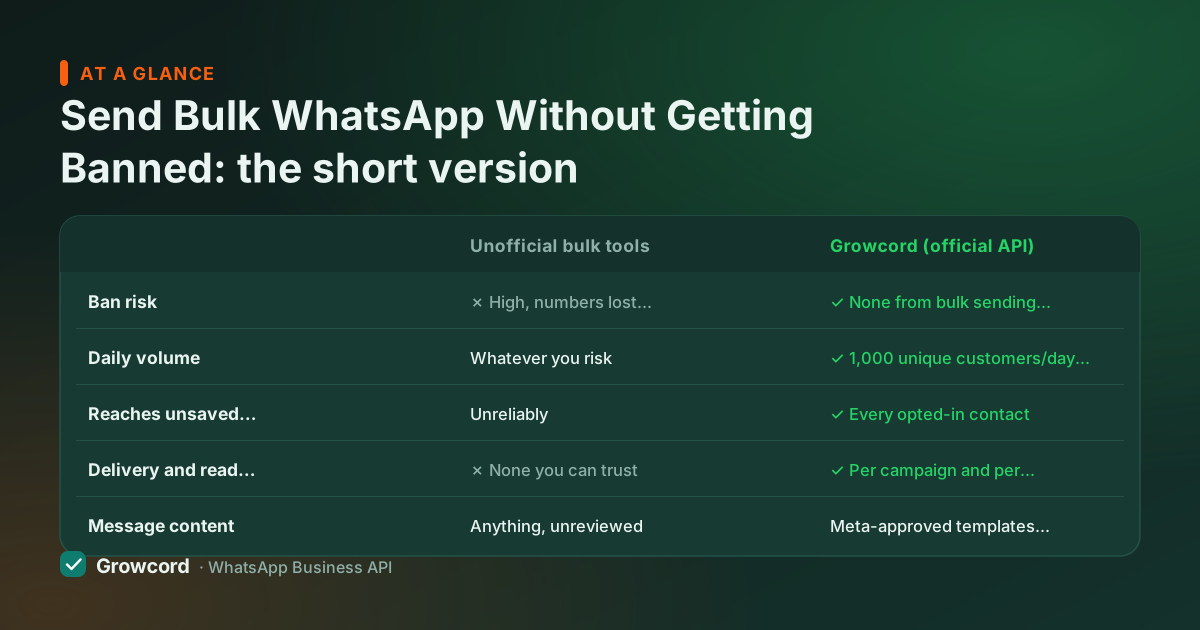
Ban risk | ✗ High, numbers lost routinely, often mid-campaign | ✓ None from bulk sending itself; this is the sanctioned channel |
Daily volume | Whatever you risk | ✓ 1,000 unique customers/day to start, growing to 100,000+ by tier |
Reaches unsaved contacts | Unreliably | ✓ Every opted-in contact |
Delivery and read reports | ✗ None you can trust | ✓ Per campaign and per contact |
Message content | Anything, unreviewed | Meta-approved templates with merge fields, media and buttons |
Business identity | ✗ A consumer account pretending | ✓ Verified business profile, green tick eligible |
Cost | Cheap until the number is gone | From ₹99/mo billed yearly + Meta's own rate (~₹0.85 per marketing conversation) |
Unofficial-tool behaviour reflects Meta's published policies and widely reported outcomes; API behaviour as implemented in Growcord. Checked August 2026.
The legitimate path to bulk WhatsApp
Get on the official API
Sign up on Growcord and connect a number through Meta's embedded signup: about ten minutes with a Business Manager admin login and a number that isn't on the WhatsApp app.
Build a list that opted in
Checkout consent, keyword replies, QR codes, click-to-chat links. Import with tags so you can send to segments instead of blasting everyone.
Get templates approved
Write the message once, submit to Meta from the dashboard, and reuse it across campaigns. Approval usually takes minutes to a few hours.
Ramp volume with quality
Start with your warmest segment, watch delivery and block rates in the report, and let the messaging tier grow on its own. Quality is the throttle, protect it.
Staying safe even on the API
Send only to contacts who opted in, consent is the foundation everything else stands on
Keep an opt-out path in every campaign and honour it immediately
Segment sends, repeat buyers and cold contacts should not get the same message
Watch the quality rating in the dashboard; pause campaigns if it dips
Space out promotional sends, a list messaged daily is a list that blocks you
Never upload purchased databases; they poison the number you built
What safe bulk messaging costs
Less than a banned number. Growcord plans start at ₹299/month, ₹99/month billed yearly, with 2,000 campaign messages on Basic; Startup at ₹799/month (₹399 yearly) carries 10,000 campaign messages, scheduling, chatbots and a shared inbox. Meta's fee is roughly ₹0.78–0.88 per marketing conversation in India, billed as prepaid credits at cost, with the estimate shown before every send. The pricing page lays out every plan and add-on.
Put against the unofficial route: a one-off bulk-sender licence, then a banned business number, re-printed stationery and packaging, and a customer list that can no longer reach you. That only looks cheaper until the first ban.
If your volumes are genuinely large, the API is also simply better at the job, broadcast software on Growcord handles segments, merge fields, scheduling and per-campaign reports that no app-automation tool can offer, because the app was never built to report on bulk sending it isn't supposed to do.
Send bulk WhatsApp the way Meta intended
Free tier to test, plans from ₹99/month billed yearly. Keep the number your customers already know.
Start free, no card neededWhy Growcord
What you get here that you don't get elsewhere
Frequently asked questions
Why did WhatsApp ban my number for sending bulk messages?
Almost certainly because the messages went through the consumer WhatsApp or WhatsApp Business app using automation, or to people who never opted in. Meta's systems detect machine-speed sending patterns and act on block/report signals from recipients. Neither is fixable with settings or 'anti-ban' mods, the app route is simply not built for bulk sending.
Can I get my banned WhatsApp number back?
Sometimes, but don't plan on it. You can appeal through WhatsApp's in-app support or Meta's business channels, and temporary bans may lift on their own. Permanent bans for bulk-messaging violations are rarely reversed. The dependable fix is prevention: move bulk sending to the official API before a ban, not after.
Is there any bulk WhatsApp sender that is 100% safe?
Only software built on the official WhatsApp Business API. Any tool that works by automating the normal WhatsApp apps, whatever it claims about delays, rotation or anti-ban technology, is violating WhatsApp's terms and can lose your number at any time. On the API, bulk sending is the intended use, so the ban risk from sending itself is zero.
Will the official API ban me if I send too many messages?
No, it throttles you transparently instead. Your number has a Meta-assigned messaging tier (1,000 unique customers per 24 hours to start) that grows automatically with good quality. What can hurt an API number is messaging people who didn't opt in: blocks lower your quality rating, which can freeze or reduce the tier. Consent, not volume, is the real limit.
How many bulk messages can I send per day on the API?
New numbers start at 1,000 unique customers per rolling 24 hours, then move to 10,000, 100,000 and effectively unlimited as quality stays healthy, most businesses climb within days of steady sending. Growcord plans meter monthly campaign volume (2,000 messages on Basic up to 250,000 on Enterprise), with add-ons for busy seasons.
Do customers have to opt in before I send them bulk messages?
Yes. Meta's policies require consent for business-initiated marketing messages, and it's also what keeps your number alive, recipients who opted in read and reply; recipients who didn't block and report. Collect opt-ins at checkout, via keyword replies, QR codes or website widgets. The opt-in guide shows consent wording that survives a Meta review.
Why businesses pick Growcord
Official WhatsApp Business API
Built on Meta's Cloud API, the sanctioned channel, not a modded app. No number-ban roulette.
Indian pricing, GST invoice
Plans from ₹99/month billed yearly. Paid in ₹ via Razorpay, with a proper GST invoice every time.
Free tier, no card needed
1 number and 50 conversations a month to prove it on real customers before paying anything.
Support from New Delhi, in IST
A real team on email and WhatsApp, Monday to Saturday 10:00–19:00 IST, not a ticket void.
Talk to us
Get set up on WhatsApp this week
Tell us what you sell and how many customers you message. We'll reply on WhatsApp with the plan that fits and, if you want it, walk you through the Meta approval step.
- No sales call unless you ask for one
- Answers from the team that builds it, in IST hours
- Free tier available. You can start before you decide
Keep reading
Related guides and comparisons
Last updated: 2026-08-07