

WhatsApp number banned: the reasons that actually trigger it
WhatsApp doesn't publish its detection rules, but the causes behind bans are consistent and well documented in Meta's Terms of Service and Business Messaging policies. In rough order of how often they hit Indian businesses:
Unofficial apps and mods. GB WhatsApp, WhatsApp Plus, desktop "bulk sender" extensions and browser scripts all automate the consumer app in ways Meta's systems are specifically built to detect. Using them violates the Terms of Service outright, the ban usually starts as temporary ("You're banned for X hours") and becomes permanent if you keep going.
Messaging without consent. Buying a database and blasting it is the classic mistake. People who never asked to hear from you block and report you, and those two signals are the strongest inputs to enforcement. It doesn't matter that your offer was genuine.
Abnormal sending patterns. A brand-new number that sends hundreds of identical messages to unsaved contacts in its first days looks exactly like a spam operation, because that is what spam operations look like. Volume that a two-year-old number with real two-way chats can carry will burn a fresh SIM.
Prohibited content and businesses. Meta's Commerce and Business policies bar certain categories, among them real-money gambling, weapons, tobacco and unlicensed financial products. Operating in a barred category, or getting reported for scam-like behaviour, can end an account regardless of sending volume.
Note the difference on the API side. Numbers on the official WhatsApp Business API rarely get "banned" the way app numbers do. Instead there's a graduated system: a quality rating (green/yellow/red) based on blocks and reports, reduced messaging limits when quality drops, and flagged or restricted states for policy violations, each visible in the dashboard, each recoverable. That visibility is a big part of why serious senders move to the API; our messaging limits guide explains the tier system.
Temporary vs permanent bans
A temporary ban shows a countdown timer and almost always means WhatsApp detected an unofficial app or automation on your number. Switch to the official app immediately and let the timer expire; repeat offences escalate.
A permanent ban shows "This account is not allowed to use WhatsApp", at that point your only route is the review process below. Creating a fresh SIM and repeating the same behaviour just gets the next number banned faster, because the behaviour, not the number, is what's detected.
What you did vs what Meta's systems see
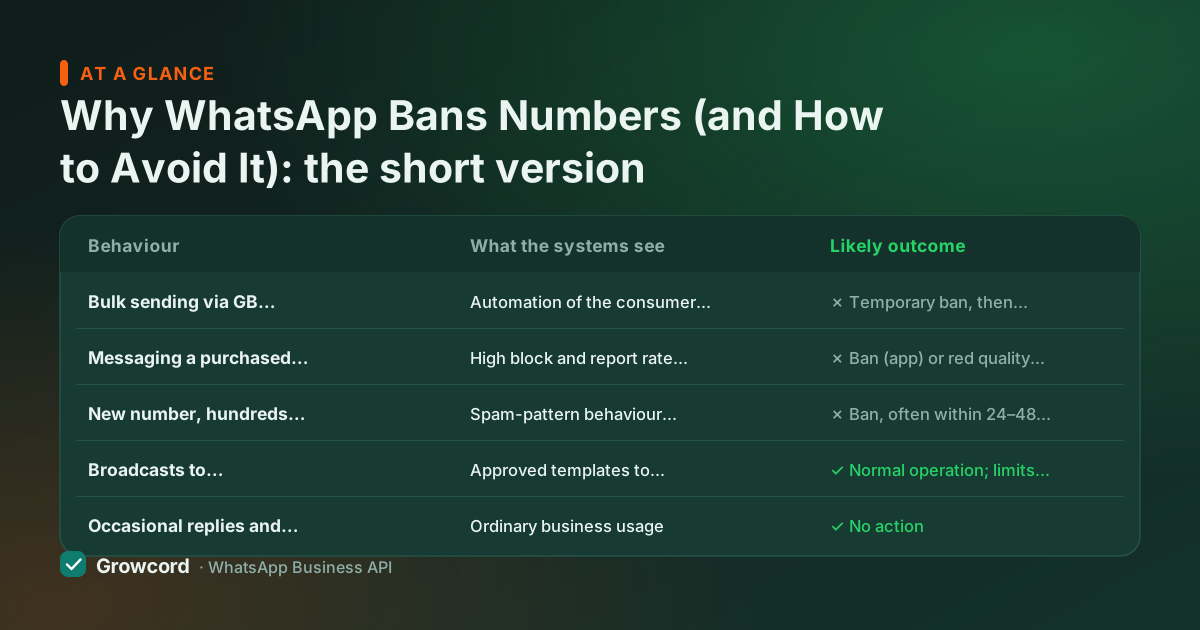
| Behaviour | What the systems see | Likely outcome |
|---|---|---|
Bulk sending via GB WhatsApp or a browser extension | Automation of the consumer app, a direct ToS violation | ✗ Temporary ban, then permanent on repeat |
Messaging a purchased list | High block and report rate from recipients | ✗ Ban (app) or red quality rating and frozen limits (API) |
New number, hundreds of identical messages on day one | Spam-pattern behaviour from an account with no history | ✗ Ban, often within 24–48 hours |
Broadcasts to customers who opted in, via the official API | Approved templates to consenting recipients | ✓ Normal operation; limits grow with good quality |
Occasional replies and personal-style chats on the Business app | Ordinary business usage | ✓ No action |
Common business behaviours and their likely outcome, per Meta's published policies. Checked August 2026.
How to appeal and unban a WhatsApp business number
Stop the behaviour first
Uninstall any mod or bulk tool and disconnect third-party scripts. A review request while the violation is still running gets nowhere.
Request a review from the ban screen
Permanently banned accounts see a Request a review option in the app. Submit it once, briefly and honestly, state what your business is and, if you believe it's an error, say why. You can also reach WhatsApp support via the in-app or website contact form; include your number in full international format (+91...).
For API numbers, use Meta Business support
Policy violations on a WhatsApp Business Account show up in Business Manager with an appeal path through Business Support Home. Attach evidence of opt-in if consent is the issue.
Wait out the review, don't churn numbers
Reviews typically take from a day to about a week. Genuine errors do get reversed. Spinning up replacement SIMs to continue the same sending pattern is the one move that guarantees the cycle repeats.
WhatsApp compliance: how businesses send at scale without bans
The uncomfortable truth: if you need to message more people than you can chat with personally, the consumer and Business apps are the wrong tools, and no trick makes them the right ones. The compliant route is the official WhatsApp Business API, the same infrastructure banks and airlines use, where bulk messaging is a supported feature rather than a violation.
The API's model is different by design. Marketing messages go out as templates that Meta approves before first use, recipients must have opted in, and every account has a quality rating you can watch in the dashboard.
New API numbers start with a daily limit on business-initiated conversations (as of August 2026, entry tiers begin around 250–1,000 per day depending on verification) and the limit rises automatically, to 10,000, 100,000 and beyond, as you send with good quality. Bad behaviour still has consequences, but they're graduated and visible instead of a sudden dead number.
That structure is why "how to send bulk WhatsApp without a ban" has a genuine answer: use the sanctioned channel, message people who asked, and keep an opt-out path in every campaign. Platforms like Growcord sit on top of the official API and add the practical safeguards, segmented sends via a broadcast tool instead of one blast to everyone, opt-out keyword handling, and quality metrics next to each campaign.
Plans start at ₹299/month, or ₹99/month billed yearly, with Meta's conversation fees passed through at Meta's published rate and no markup added; see pricing for the full table.
The stay-safe checklist
Official apps or official API only, no mods, no bulk-sender extensions
Message only people who opted in, and keep a record of the opt-in
Warm up new numbers: real two-way conversations before any volume
Include a working opt-out ("Reply STOP") in every promotional send
Honour opt-outs immediately and remove those contacts from segments
Watch block rates and quality rating; pause campaigns when they dip
Keep your business category and content within Meta's Commerce Policy
Message at scale the sanctioned way
Growcord runs on the official WhatsApp Business API, approved templates, opt-out handling and quality metrics built in. Free tier: 1 number, 50 conversations a month.
Start free, no card neededWhy Growcord
What you get here that you don't get elsewhere
Frequently asked questions
Why did WhatsApp ban my number without warning?
Almost always because automated systems detected an unofficial app, a spam-like sending pattern, or a spike in blocks and reports. Enforcement is algorithmic, so there's often no human warning step, temporary bans for modded apps show a timer, while serious or repeated violations go straight to a permanent ban.
How long does a WhatsApp ban last?
Temporary bans show a countdown, commonly a few hours to a couple of days, and lift automatically, but repeat the behaviour and they escalate to permanent. A permanent ban has no expiry; it only lifts if a review request succeeds, which typically takes from a day to about a week to process.
How do I unban my WhatsApp business number?
Use the Request a review option on the ban screen, or contact WhatsApp support through the app or website with your number in international format. First remove whatever caused the ban, mods, bulk tools, non-consensual sending. For numbers on the Business API, appeal through Meta Business Support Home in Business Manager. Genuine errors do get reversed.
Will I get banned for sending bulk messages on the official API?
Not for the bulk sending itself, that's what the API is built for. Broadcasts go out as Meta-approved templates to opted-in contacts within your messaging tier. What still hurts you is messaging people who didn't consent: blocks and reports lower your quality rating and can freeze or reduce your limits, though the process is visible and recoverable.
Is GB WhatsApp safe for business use?
No. GB WhatsApp, WhatsApp Plus and similar mods violate WhatsApp's Terms of Service, and Meta actively detects them, bans start temporary and become permanent. They also lack end-to-end guarantee updates and are a known malware vector. If you need business features the official apps lack, the WhatsApp Business API is the sanctioned route.
Can I just use a new SIM after a permanent ban?
You can register a new number, but if it repeats the same behaviour it will be detected faster. The pattern is what's flagged, not just the number. You'll also lose your chat history and the trust of customers who saved the old number. Fixing the sending practice, or moving to the official API, is the only durable answer.
Why businesses pick Growcord
Official WhatsApp Business API
Built on Meta's Cloud API, the sanctioned channel, not a modded app. No number-ban roulette.
Indian pricing, GST invoice
Plans from ₹99/month billed yearly. Paid in ₹ via Razorpay, with a proper GST invoice every time.
Free tier, no card needed
1 number and 50 conversations a month to prove it on real customers before paying anything.
Support from New Delhi, in IST
A real team on email and WhatsApp, Monday to Saturday 10:00–19:00 IST, not a ticket void.
Talk to us
Get set up on WhatsApp this week
Tell us what you sell and how many customers you message. We'll reply on WhatsApp with the plan that fits and, if you want it, walk you through the Meta approval step.
- No sales call unless you ask for one
- Answers from the team that builds it, in IST hours
- Free tier available. You can start before you decide
Keep reading
Related guides and comparisons
Last updated: 2026-08-07