

Green tick, blue tick, grey tick, what each actually means
The vocabulary got messy after Meta's redesign, so here's the map as of August 2026:
- The "green tick" everyone searches for is the Official Business Account (OBA) badge, the checkmark next to a brand's name on WhatsApp. Meta recoloured it blue around 2024–2025 to match verified badges on Facebook and Instagram. Same badge, same meaning, new colour; Indian users still call it the green tick.
- Meta business verification is the document check in Business Manager. It confirms your legal identity, lifts your messaging limit from 250 to 1,000, and is a prerequisite for the badge, but it does not itself show any tick to customers.
- Meta Verified is a paid subscription that grants a verified badge plus impersonation protection and support, without the notability requirement. It launched on the WhatsApp Business app and Meta has been expanding availability; pricing is a monthly fee that varies by country and channel.
The classic OBA badge is free to apply for and impossible to purchase. Any agency selling a "guaranteed green tick" is selling a hope, not a service, Meta alone decides, and its main criterion is whether your brand is publicly notable.
Green tick requirements in India
Before Meta will even review an Official Business Account request, the basics must be in place:
- A WhatsApp Business API account (the free Business app can't hold the OBA badge, here's how to get the API)
- Meta business verification completed, with documents matching your legal entity, GST registration, certificate of incorporation or similar
- A display name that follows Meta's naming rules and matches your real brand
- Two-step verification enabled on the number
Those get you to the starting line. The decision itself turns on notability: Meta looks for organic coverage of your brand in recognised news publications, as a working rule, several substantive articles in known outlets over the past couple of years.
Paid PR, press releases, sponsored posts, directory listings and your own blog don't count. This is the honest reason most small businesses are declined: the badge is designed for brands the public might try to impersonate, not as a reward for good conduct.
The application, step by step
Finish Meta business verification
In Meta Business Manager, submit your legal documents and confirm your business details. Approval usually takes a few days and raises your messaging tier to 1,000 customers a day along the way.
Get your API account in order
Display name approved and matching your brand, two-step verification on, and some genuine messaging history on the number. A dormant number with zero activity is a weak applicant.
Submit the Official Business Account request
In WhatsApp Manager (under your phone number's profile settings), request the official business account review. You can attach supporting links. This is where your press coverage goes. Platforms like Growcord can point you to the right screen, but the request goes to Meta.
Wait, and reapply if declined
Decisions typically come back within days to a few weeks. A rejection isn't permanent. You can reapply after 30 days, and the sensible use of that gap is earning more organic coverage.
The three verification paths compared
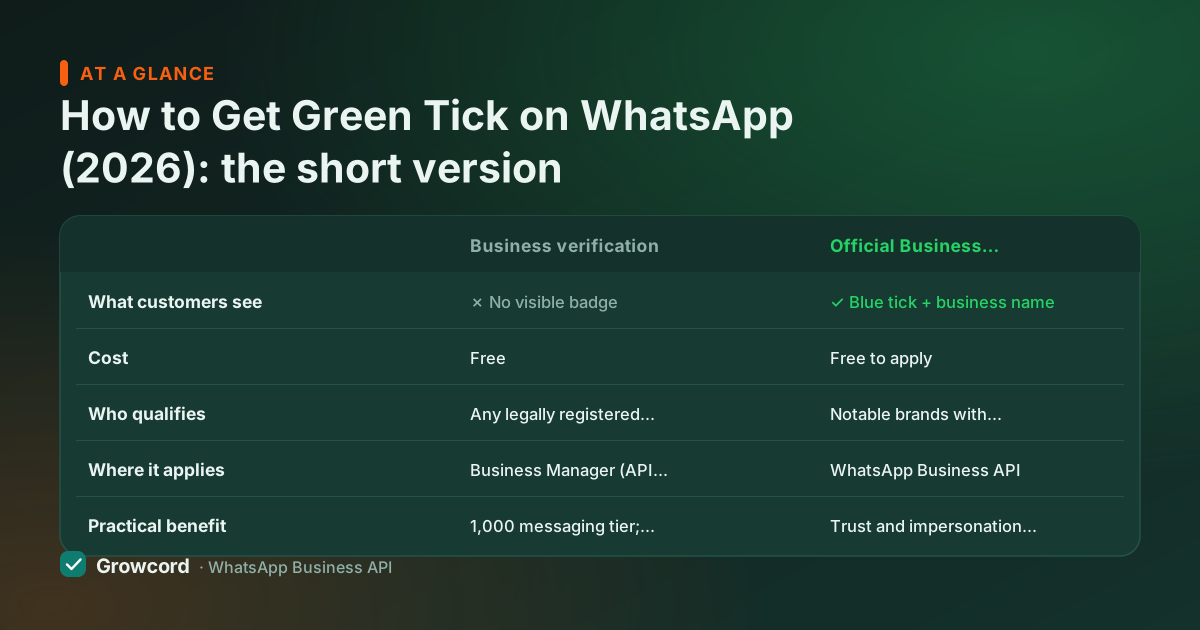
| Business verification | Official Business Account | Meta Verified | |
|---|---|---|---|
What customers see | ✗ No visible badge | ✓ Blue tick + business name | ✓ Blue tick |
Cost | Free | Free to apply | Paid monthly subscription |
Who qualifies | Any legally registered business | Notable brands with organic press coverage | Businesses that pass Meta's authenticity checks |
Where it applies | Business Manager (API prerequisite) | WhatsApp Business API | Started on the Business app; availability expanding |
Practical benefit | 1,000 messaging tier; prerequisite for the badge | Trust and impersonation protection at brand scale | Badge without the notability test |
As documented by Meta, checked August 2026.
What the badge does, and doesn't do
Worth being clear-eyed here, because the green tick is one of the most oversold items in WhatsApp marketing. What it gives you: the checkmark beside your name, your display name shown instead of a bare phone number even for people who haven't saved you, and a harder target for impersonators.
For a brand doing customer service at scale that matters: a customer who has never saved your number sees your brand name rather than +91 98XXX XXXXX before deciding whether to open the message.
What it doesn't do: it doesn't raise your messaging limits (business verification does that), doesn't change Meta's per-message pricing, doesn't improve delivery, and doesn't protect a low quality rating. Every capability that makes the API useful, broadcasts, bots, the team inbox, commerce automations, works identically with or without it.
So sequence it sensibly: get on the API, verify the business, build a clean messaging operation, and let the badge come when your brand's public footprint supports it. Growcord runs entirely on the official Cloud API, so everything above happens in one place, from connecting your number (the quick-start docs take you through it) to the pricing, which starts at ₹299/month, or ₹99/month billed yearly.
Improving your approval odds
Earn organic press, product launches, funding, founder interviews in recognised publications
Keep the display name identical to the brand name people search for
Complete business verification well before you apply, not the same week
Build real messaging activity on the number, support chats, order updates, campaigns
Attach your strongest 4–6 press links to the request; skip paid placements entirely
If declined, wait the 30 days and reapply with genuinely new coverage
Get on the official API first, the badge follows
Free tier: 1 number and 50 conversations a month on the official Meta Cloud API. Verification-ready from day one.
Start free, no card neededWhy Growcord
What you get here that you don't get elsewhere
Frequently asked questions
Is the WhatsApp green tick free?
The classic Official Business Account badge is free to apply for. Meta charges nothing, and no agency can legitimately sell it. The catch is selectivity: Meta grants it mainly to notable brands with organic press coverage. The separate Meta Verified subscription is the paid route, with a monthly fee that varies by country, and it skips the notability requirement.
Why is the green tick blue now?
Meta recoloured the WhatsApp verification badge from green to blue around 2024–2025 to match verified badges across Facebook and Instagram. It's the same Official Business Account status with the same meaning, only the colour changed. Searches and everyday speech in India still overwhelmingly say green tick, which is why this guide uses both names.
Can I get the green tick on the WhatsApp Business app?
Not the classic Official Business Account badge. That requires a WhatsApp Business API account. The Business app's route to a badge is the paid Meta Verified subscription, which Meta launched for app users and has been expanding. If you want the OBA badge, the first step is moving your number to the API through a platform or directly with Meta.
Why was my green tick application rejected?
The most common reason is insufficient notability, Meta didn't find enough organic coverage of your brand in recognised publications. Other frequent causes: business verification incomplete, a display name that doesn't match the brand, or very little messaging activity on the number. Rejection isn't a penalty and doesn't affect your account; you can reapply after 30 days.
How long does WhatsApp green tick approval take?
Once you submit the Official Business Account request, decisions typically arrive within a few days to a few weeks, based on commonly reported timelines as of August 2026. The prerequisite steps take longer in practice, Meta business verification can take several days, and building the press footprint that approval actually turns on takes months for most businesses.
Does the green tick increase my messaging limits?
No. Messaging tiers are controlled by Meta business verification, your sending volume and your quality rating, not by the badge. A business without the tick can reach the unlimited tier, and a badged brand with a falling quality rating can still be downgraded. The badge is about trust and impersonation protection, not sending capacity.
Why businesses pick Growcord
Official WhatsApp Business API
Built on Meta's Cloud API, the sanctioned channel, not a modded app. No number-ban roulette.
Indian pricing, GST invoice
Plans from ₹99/month billed yearly. Paid in ₹ via Razorpay, with a proper GST invoice every time.
Free tier, no card needed
1 number and 50 conversations a month to prove it on real customers before paying anything.
Support from New Delhi, in IST
A real team on email and WhatsApp, Monday to Saturday 10:00–19:00 IST, not a ticket void.
Talk to us
Get set up on WhatsApp this week
Tell us what you sell and how many customers you message. We'll reply on WhatsApp with the plan that fits and, if you want it, walk you through the Meta approval step.
- No sales call unless you ask for one
- Answers from the team that builds it, in IST hours
- Free tier available. You can start before you decide
Keep reading
Related guides and comparisons
Last updated: 2026-08-07