

What Meta's opt-in policy actually requires
Meta doesn't prescribe a form or a format. Its Business Messaging Policy, as of August 2026, requires that a person opt in before you initiate messages, that the opt-in names your business, and that it's clear messages will arrive over WhatsApp.
How you collect it, a website checkbox, a keyword reply, a spoken yes captured on a call, is left to you. What isn't optional is honouring opt-outs and being able to show, if asked, that consent existed.
The enforcement mechanism is worth understanding because it's automatic and unforgiving. Every block and "report spam" a customer files counts against your number's quality rating. A falling rating gets your messaging limits frozen, then lowered; templates can be paused; persistent offenders lose the number.
Messaging people who never asked to hear from you is the single most reliable way to trigger all of it, which is why opt-in isn't compliance theatre, it's what keeps the channel working. The guide to WhatsApp bans walks through that spiral in detail.
WhatsApp marketing consent under Indian law
Two clarifications for India, because the confusion is everywhere. First: DLT registration does not apply to WhatsApp. The TRAI DLT regime (headers, template registration with telecom operators) governs SMS. WhatsApp messaging is governed by Meta's policies plus general data-protection law.
Second: that general law is now the DPDP Act 2023, and it has teeth. For WhatsApp marketing it means consent must be a clear affirmative action, an unticked box the customer ticks, never a pre-ticked one and never something buried inside your terms and conditions. The notice must say what messages they'll get.
Consent should be purpose-specific: agreeing to order updates is not agreeing to daily offers, so collect marketing consent separately from transactional. Withdrawal must be as easy as the opt-in, a STOP reply qualifies. And you should keep a record: number, timestamp, source and what exactly was consented to. Growcord's contact fields and tags are a workable place to hold this, with the opt-in source stamped on each contact at import or capture.
Opt-in methods that hold up
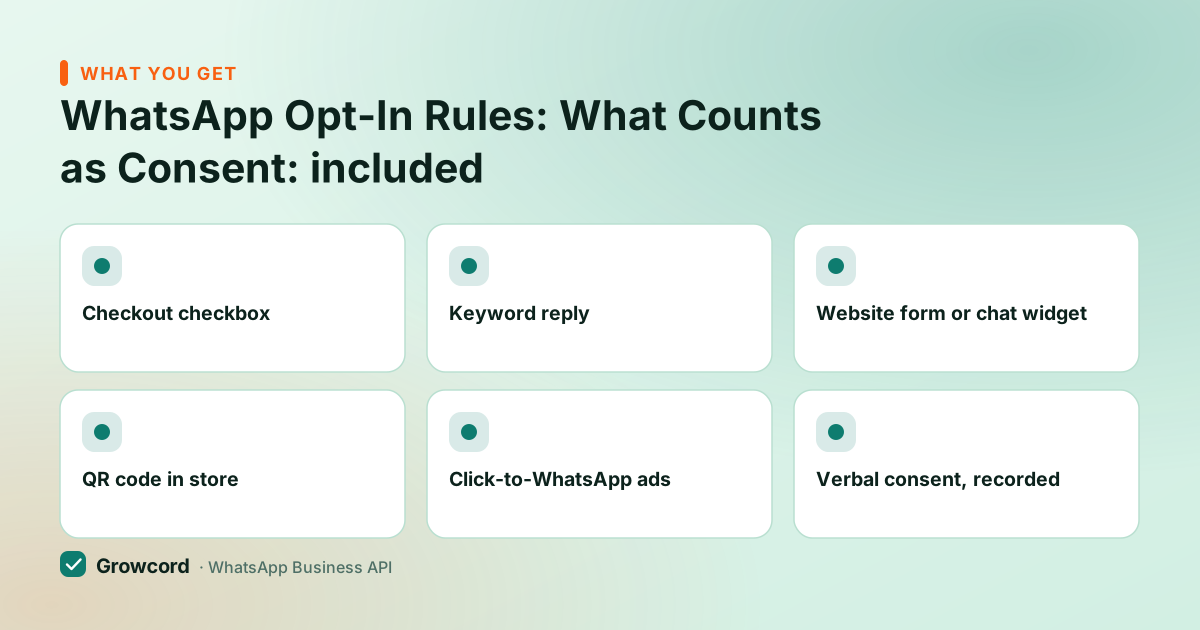
Checkout checkbox
An unticked box at checkout: "Send me order updates and offers from [brand] on WhatsApp." The order record doubles as your consent record.
Keyword reply
Customer sends JOIN (or any word) to your number. The inbound message is itself the proof, timestamped, in their own hand.
Website form or chat widget
A WhatsApp field on your lead form with explicit consent text, or a chat button that starts the conversation from their side.
QR code in store
A counter-top QR that opens a pre-filled "JOIN" chat. Works for kiranas, salons and clinics where the customer is standing in front of you.
Click-to-WhatsApp ads
The customer taps your ad and messages first, consent by initiation, plus a free 72-hour messaging window to respond in.
Verbal consent, recorded
On sales or IVR calls: ask, note the timestamp and the script used. Weaker than written forms, so follow up with a confirmation message.
Opt-in examples you can copy
Checkout or signup checkbox (unticked by default):
"Yes, send me order updates and occasional offers from [Brand] on WhatsApp at the number above. I can opt out anytime by replying STOP."
Confirmation message after a keyword join (also your consent receipt):
"Welcome! You're now on [Brand]'s WhatsApp list for offers and updates, usually 2–4 messages a month. Reply STOP anytime to leave."
In-store sign next to a QR code:
"Scan to get our new-arrival alerts and member offers on WhatsApp. We message a few times a month, never share your number, and STOP unsubscribes you instantly."
Notice what all three do: name the brand, name the channel, hint at frequency, and state the exit. That last part isn't decoration, telling people how to leave is precisely what stops them choosing "report spam" instead, and a block hurts your number while a STOP doesn't.
Handling opt-outs so they actually stick
Every marketing template you send should carry an opt-out line ("Reply STOP to opt out") or an equivalent button. When the STOP arrives, it must work everywhere, permanently, not just for that campaign.
In Growcord the standard setup is an auto-reply or bot flow that catches STOP and its cousins (UNSUBSCRIBE, "band karo"), tags the contact as opted-out, confirms it in one line, and the opted-out tag excludes them from every future campaign segment. Transactional messages they still need, an order they placed yesterday still ships, but marketing stops that instant.
Run it this way and opt-in stops being a legal chore. A list built on real consent blocks less, which keeps the quality rating green, which keeps your messaging tier climbing, and you can watch all three in the campaign report after every broadcast instead of finding out when Meta cuts your limit.
The consent record to keep for every contact
Phone number, exactly as messaged
Timestamp of the opt-in
Source, checkout, keyword, QR, form, ad, call
What they consented to: transactional, marketing, or both
The wording or script shown at the time
Opt-out date, if and when it comes, honoured across all campaigns
Build a list you're allowed to message
Keyword opt-ins, tagged consent sources and automatic STOP handling, free to start with 50 conversations a month.
Start free, no card neededWhy Growcord
What you get here that you don't get elsewhere
Frequently asked questions
Do I need permission to send WhatsApp marketing messages?
Yes. Meta's policy requires opt-in before any business-initiated message, and India's DPDP Act 2023 requires consent that's a clear affirmative action, purpose-specific and easy to withdraw. Beyond legality, it's self-interest: messaging people without consent produces blocks and spam reports, which lower your quality rating, freeze your messaging limits and can end in a ban.
Is DLT registration required for WhatsApp marketing in India?
No. The TRAI DLT regime, entity registration, headers, template scrubbing, applies to SMS, not WhatsApp. WhatsApp business messaging is governed by Meta's Business Messaging Policy plus Indian data-protection law (the DPDP Act 2023). You register templates with Meta for approval, but that's Meta's process, unrelated to DLT.
What counts as a valid WhatsApp opt-in?
Any clear, recorded agreement that names your business and the WhatsApp channel: an unticked checkbox the customer ticks at checkout, a keyword like JOIN messaged to your number, a QR-code scan that starts a chat, a form with explicit consent text, or the customer initiating via a Click-to-WhatsApp ad. Pre-ticked boxes, consent buried in terms, and purchased lists don't qualify.
Can I message my old customers who never opted in?
Not with marketing templates, a past purchase is not marketing consent under the DPDP Act's standard. The clean fix: invite the opt-in through a channel you do have (email, SMS, a checkout prompt, an in-store QR) and message the ones who say yes. Transactional messages about a live order they placed are a different, defensible category, but keep them strictly non-promotional.
What happens if I message people without opt-in on the API?
The recipients block and report you, Meta's systems read those signals, and your number's quality rating falls. Consequences arrive in order: messaging tier frozen, then reduced, templates paused, and ultimately the number can be banned. It usually shows up within days of a bad campaign, not months, the feedback loop is fast because it's driven by recipient behaviour.
How should I handle STOP replies?
Automatically and globally. Set an auto-reply or bot flow that catches STOP and similar phrases, tags the contact opted-out, and sends a one-line confirmation. That tag must exclude them from every future marketing segment, not just the current campaign. Under the DPDP Act, withdrawing consent must be as easy as giving it, a single reply doing the whole job is exactly that.
Why businesses pick Growcord
Official WhatsApp Business API
Built on Meta's Cloud API, the sanctioned channel, not a modded app. No number-ban roulette.
Indian pricing, GST invoice
Plans from ₹99/month billed yearly. Paid in ₹ via Razorpay, with a proper GST invoice every time.
Free tier, no card needed
1 number and 50 conversations a month to prove it on real customers before paying anything.
Support from New Delhi, in IST
A real team on email and WhatsApp, Monday to Saturday 10:00–19:00 IST, not a ticket void.
Talk to us
Get set up on WhatsApp this week
Tell us what you sell and how many customers you message. We'll reply on WhatsApp with the plan that fits and, if you want it, walk you through the Meta approval step.
- No sales call unless you ask for one
- Answers from the team that builds it, in IST hours
- Free tier available. You can start before you decide
Keep reading
Related guides and comparisons
Last updated: 2026-08-07