

How the customer service window works
Every conversation on the WhatsApp Business API is governed by one clock. When a customer sends your business any message, a text, a voice note, a tap on one of your buttons, a 24-hour window opens for that customer on that number.
Every further message from them restarts the clock, so an active back-and-forth chat effectively keeps the window open indefinitely. The moment 24 hours pass with no new customer message, the window closes.
The rule exists for a simple reason: Meta wants WhatsApp to stay a place where businesses answer people, not chase them. While the customer is engaged you can say anything; once they've gone quiet, you need a template that Meta has reviewed.
Three details trip people up:
- The window is per customer, per number. Customer A's window has nothing to do with customer B's, and the same customer has separate windows with each of your WhatsApp numbers.
- It's a rolling window, not a fixed one. It always measures 24 hours from the customer's latest message, not from the first one.
- Button taps and list selections count as customer messages. A customer tapping "Track my order" in your bot flow restarts their clock just like typed text would.
What you can send inside the session window
Inside an open window you're unrestricted in format: plain text, images, video, PDFs, locations, contact cards, interactive buttons and list messages. Nothing needs pre-approval, and your team or your chatbot can respond instantly.
Meta made these service messages free of charge in late 2024, and that's still the case as of August 2026, a support conversation where the customer writes first costs you nothing in Meta fees, no matter how many replies it takes.
This is why fast replies are worth real money. A lead who messages you today and gets an answer within the hour is handled entirely inside a free window. The same lead answered three days later needs a paid template just to restart the conversation, and by then they've usually talked to a competitor. Our guide on responding to leads faster covers this in detail.
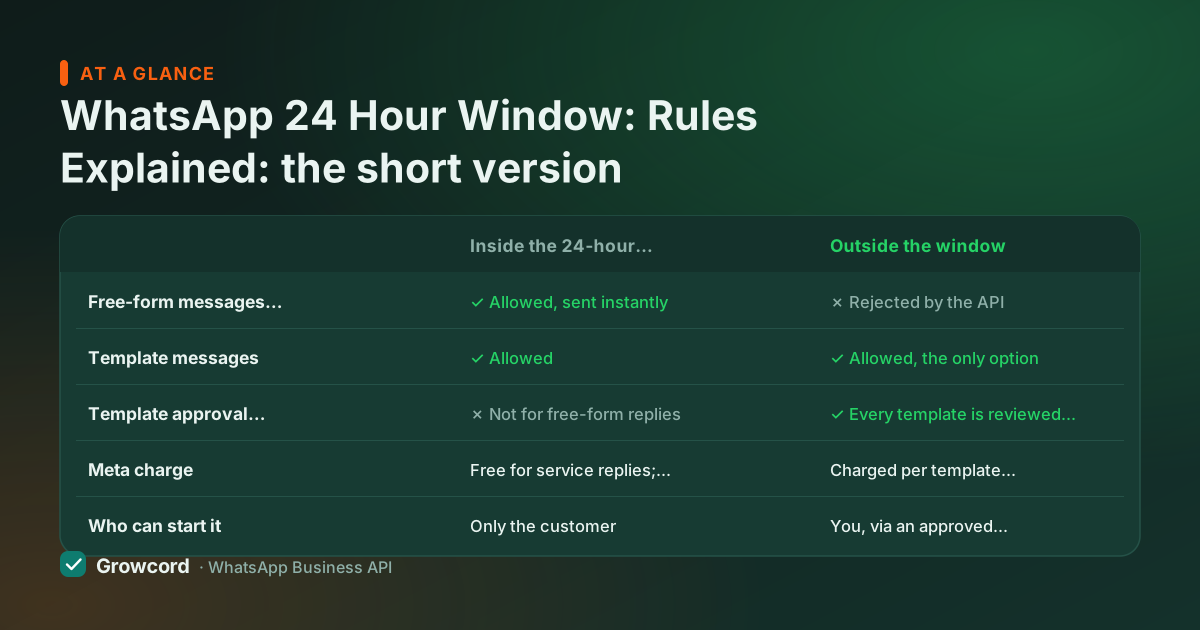
Inside vs outside the window, at a glance
| Inside the 24-hour window | Outside the window | |
|---|---|---|
Free-form messages (text, media, buttons) | ✓ Allowed, sent instantly | ✗ Rejected by the API |
Template messages | ✓ Allowed | ✓ Allowed, the only option |
Template approval needed | ✗ Not for free-form replies | ✓ Every template is reviewed by Meta first |
Meta charge | Free for service replies; utility templates also free here | Charged per template message, by category |
Who can start it | Only the customer | You, via an approved template |
Behaviour of the WhatsApp Business API as documented by Meta, checked August 2026.
Template messages outside the window
When the window is closed, you reach the customer with a template message, a pre-written format Meta has approved, with variables for the personal bits (name, order number, amount due). Templates come in three categories, and since Meta's July 2025 pricing change each delivered template is billed per message rather than per conversation:
- Marketing, offers, announcements, winbacks. In India these cost about ₹0.86 per delivered message as of August 2026.
- Utility, order updates, delivery alerts, payment reminders. About ₹0.115, and free when delivered inside an already-open customer service window.
- Authentication, OTPs and verification codes, priced the same as utility.
The full breakdown, including how Growcord bills these as credits at Meta's published rate with no markup added, is in our conversation pricing guide. And if the customer replies to your template, even with a button tap, a fresh 24-hour window opens and you're back to free-form chat. Well-written templates end with a question or buttons for exactly this reason; see our template message examples for formats Meta approves.
One compliance note: a template lets you *technically* message anyone, but marketing templates should only go to people who opted in. Meta tracks blocks and reports, and messaging cold lists is the fastest way to a falling quality rating. The opt-in guide shows consent formats that hold up.
The 72-hour free entry point window
There's one generous exception. When a customer reaches you through a click-to-WhatsApp ad on Facebook or Instagram, or a call-to-action button on your Facebook Page, Meta opens a 72-hour free entry point window.
For those three days, every message you send that customer, including marketing templates, is free of Meta charges, as of August 2026. If you run click-to-WhatsApp ads, your follow-up sequence should do its heavy lifting inside those 72 hours; our guide on converting Facebook leads on WhatsApp maps this out.
Working with the window, not against it
Reply fast, every conversation answered inside the window is free and warmer
End replies with a question or buttons, so the customer's answer restarts the clock
Use utility templates for order and payment updates, they're the cheap category
Collect opt-ins at checkout and in chat, so re-opening with marketing templates stays compliant
Design bot flows to gather everything they need in one session, while the window is open
Keep a few approved re-engagement templates ready before you need them
How Growcord handles the window for you
You shouldn't have to do window arithmetic per contact. In Growcord's shared team inbox, each conversation shows whether the service window is open; when it has closed, the composer switches to template sending so nobody wastes time on a free-form message the API would reject. Auto-replies and bot flows answer inbound messages in seconds, which means enquiries that arrive at 11 pm are engaged inside their own free window instead of expiring overnight. Campaigns and scheduled broadcasts always go out as approved templates, with the estimated credit cost shown before you confirm.
Plans start at ₹299/month (₹99/month billed yearly), and the free tier includes 1 number and 50 conversations a month, enough to watch the window mechanics work on real chats. Full plan details are on the pricing page.
See the 24-hour window handled automatically
Free tier: 1 number, 50 conversations a month. The inbox tracks every window so your team doesn't have to.
Start free, no card neededWhy Growcord
What you get here that you don't get elsewhere
Frequently asked questions
Can I message a customer on WhatsApp after 24 hours?
Yes, but only with a template message that Meta has approved in advance. Free-form messages are rejected by the API once the customer's last message is more than 24 hours old. Templates are billed per delivered message by category, marketing, utility or authentication, and if the customer replies, a fresh 24-hour window opens for normal chat.
Does the 24-hour window reset every time the customer replies?
Yes. The window always measures 24 hours from the customer's most recent message, not their first. Any inbound message restarts it, typed text, a voice note, even tapping a button in your bot flow. An ongoing conversation therefore never expires; the window only closes after the customer has been silent for a full 24 hours.
Is messaging free inside the 24-hour window?
Yes, as of August 2026. Meta made customer-service conversations free of charge, so replies you send inside a window the customer opened cost nothing in Meta fees, regardless of volume. Utility templates delivered inside an open window are also free. Marketing templates are the exception, they carry their per-message fee wherever they're sent, except during a 72-hour free entry point window.
Does the 24-hour rule apply to the normal WhatsApp Business app?
No. The customer service window is a WhatsApp Business API rule. In the free Business app you chat like a regular user and can write to saved contacts at any time. The trade-off is everything else the app can't do, no automation, no team inbox, no broadcasts beyond 256 saved contacts. Our comparison of the Business app vs the API covers when to switch.
What is the 72-hour free entry point window?
It's an extended window Meta opens when a customer messages you via a click-to-WhatsApp ad or a Facebook Page call-to-action button. For 72 hours, all messages you send that customer, including marketing templates, are free of Meta charges, as of August 2026. It exists to make ad-driven conversations cheap to work, so front-load your follow-up into those three days.
What happens if I try to send a normal message outside the window?
The API refuses it. The message is not delivered and Meta returns a re-engagement error indicating the customer hasn't messaged you within 24 hours. Nothing reaches the customer and nothing is charged. Tools built on the API, Growcord included, prevent this by switching the conversation to template sending once the window has closed.
Why businesses pick Growcord
Official WhatsApp Business API
Built on Meta's Cloud API, the sanctioned channel, not a modded app. No number-ban roulette.
Indian pricing, GST invoice
Plans from ₹99/month billed yearly. Paid in ₹ via Razorpay, with a proper GST invoice every time.
Free tier, no card needed
1 number and 50 conversations a month to prove it on real customers before paying anything.
Support from New Delhi, in IST
A real team on email and WhatsApp, Monday to Saturday 10:00–19:00 IST, not a ticket void.
Talk to us
Get set up on WhatsApp this week
Tell us what you sell and how many customers you message. We'll reply on WhatsApp with the plan that fits and, if you want it, walk you through the Meta approval step.
- No sales call unless you ask for one
- Answers from the team that builds it, in IST hours
- Free tier available. You can start before you decide
Keep reading
Related guides and comparisons
Last updated: 2026-08-07