

What an approved template format looks like
Before the examples, the rules that decide approval. A template has up to four parts: an optional header (text, image, video or PDF), a required body, an optional short footer, and optional buttons, quick replies like "Confirm", or links and phone numbers. Personalisation uses numbered variables written as {{1}}, {{2}} and so on; at submission you provide sample values so the reviewer can see a realistic message.
Every template is assigned a category, marketing, utility or authentication, and the category sets what each send costs (about ₹0.86 for marketing and ₹0.115 for utility in India, as of August 2026; the conversation pricing guide has the full rate card). The single most common rejection is promotional copy submitted as utility: reviewers recategorise or reject it, so label honestly from the start.
Three formatting habits keep approvals fast: keep variables surrounded by static text (a message that's mostly placeholders gets rejected), use full URLs rather than link shorteners, and give every marketing template an opt-out line. The examples below follow all three.
Marketing template examples
1. Festival offer
Hi {{1}}, Diwali prices are live at {{2}}. Flat 20% off everything till Sunday, use code {{3}} at checkout. Shop: {{4}}. Reply STOP to opt out.
2. New collection launch
Hi {{1}}, the new {{2}} collection just landed. As a regular customer you get early access until Friday before we announce it anywhere else: {{3}}. Reply STOP to opt out.
3. Coupon for repeat customers
Hi {{1}}, thank you for ordering with us again this year. Here's ₹{{2}} off your next order, code {{3}}, valid for 7 days. Reply STOP to opt out.
4. Event or webinar invite
Hi {{1}}, we're hosting a free session on {{2}} this {{3}} at {{4}} IST. Seats are limited, reply YES and we'll send you the joining link. Reply STOP to opt out.
5. Winback for lapsed customers
Hi {{1}}, it's been a while since your last visit. We've kept a 15% welcome-back code for you: {{2}}, valid till {{3}}. Reply STOP to opt out.
Add a quick-reply button ("Show me") or a link button to each of these, button taps are how you measure interest, and replies open a free 24-hour service window where your team or a bot can close the sale.
Utility template examples
Utility templates must relate to a transaction the customer already has with you. Kept clean of promotion, they're cheap, and free when sent inside an open service window.
6. Order confirmation
Hi {{1}}, your order {{2}} is confirmed. Total: ₹{{3}}, paid by {{4}}. We'll message you here the moment it ships. Track anytime: {{5}}
7. Out for delivery
Hi {{1}}, your order {{2}} is out for delivery today. Keep your phone reachable, the delivery partner may call before arriving.
8. Booking confirmation
Hi {{1}}, your appointment at {{2}} is confirmed for {{3}} at {{4}}. Reply RESCHEDULE if you need a different slot, or CANCEL to cancel.
9. Documents received
Hi {{1}}, we've received your documents for application {{2}}. Verification usually takes {{3}} working days, we'll update you here as soon as it completes.
Reminder templates
Reminders are usually utility (tied to an existing booking or bill). Give people a one-tap way to act, a payment link or a Confirm button, because the reminder is only as good as the action it triggers.
10. Appointment reminder
Hi {{1}}, a reminder for your appointment tomorrow at {{2}} with {{3}}. Reply 1 to confirm or 2 to reschedule. See you soon.
11. Payment due
Hi {{1}}, invoice {{2}} for ₹{{3}} is due on {{4}}. You can pay in one step here: {{5}}. Please ignore this if you've already paid.
12. Fee or EMI instalment
Hi {{1}}, your {{2}} instalment of ₹{{3}} is due on {{4}}. Paying on time keeps your account in good standing. Pay securely: {{5}}
13. Membership renewal
Hi {{1}}, your {{2}} membership ends on {{3}}. Renew before it lapses to keep your current rate: {{4}}. Questions? Just reply here.
Ecommerce template examples
Store automations live or die on these five. Note the categories: order-related updates are utility, but cart recovery, restock alerts, review requests and reorder nudges count as marketing under Meta's rules, budget for the marketing rate and include the opt-out.
14. Abandoned cart
Hi {{1}}, you left {{2}} in your cart at {{3}}. It's still saved, finish your order in one tap: {{4}}. Reply STOP to opt out.
15. COD confirmation
Hi {{1}}, please confirm your cash-on-delivery order {{2}} worth ₹{{3}}. Reply 1 to confirm or 2 to cancel. We hold unconfirmed orders for 24 hours before releasing the stock.
16. Back in stock
Hi {{1}}, good news, {{2}} is back in stock. You asked us to let you know; quantities are limited this time: {{3}}. Reply STOP to opt out.
17. Review request
Hi {{1}}, hope you're enjoying your {{2}}. Would you leave us a quick rating? It takes 30 seconds and genuinely helps a small business: {{3}}. Reply STOP to opt out.
18. Reorder reminder
Hi {{1}}, running low on {{2}}? Most customers reorder around the one-month mark. Tap to reorder with your saved details: {{3}}. Reply STOP to opt out.
The COD template (15) deserves special mention for Indian stores: paired with quick-reply buttons, it filters fake orders before they ship, which is where COD RTO losses actually get fixed. In Growcord, templates 14–18 come wired to store events via the Shopify and WooCommerce integrations, so "cart abandoned 45 minutes ago" fires the template without anyone pressing send.
Why templates get rejected, avoid these
Promotional copy submitted as utility, the number one rejection reason
Variables stacked together or a message that's mostly placeholders
Missing sample values for the variables at submission
Link shorteners like bit.ly instead of your full domain
Asking for card numbers, passwords, OTPs or government IDs
Shouting formatting, ALL CAPS, walls of emoji, repeated exclamation marks
Copy so vague the reviewer can't tell what the message is for
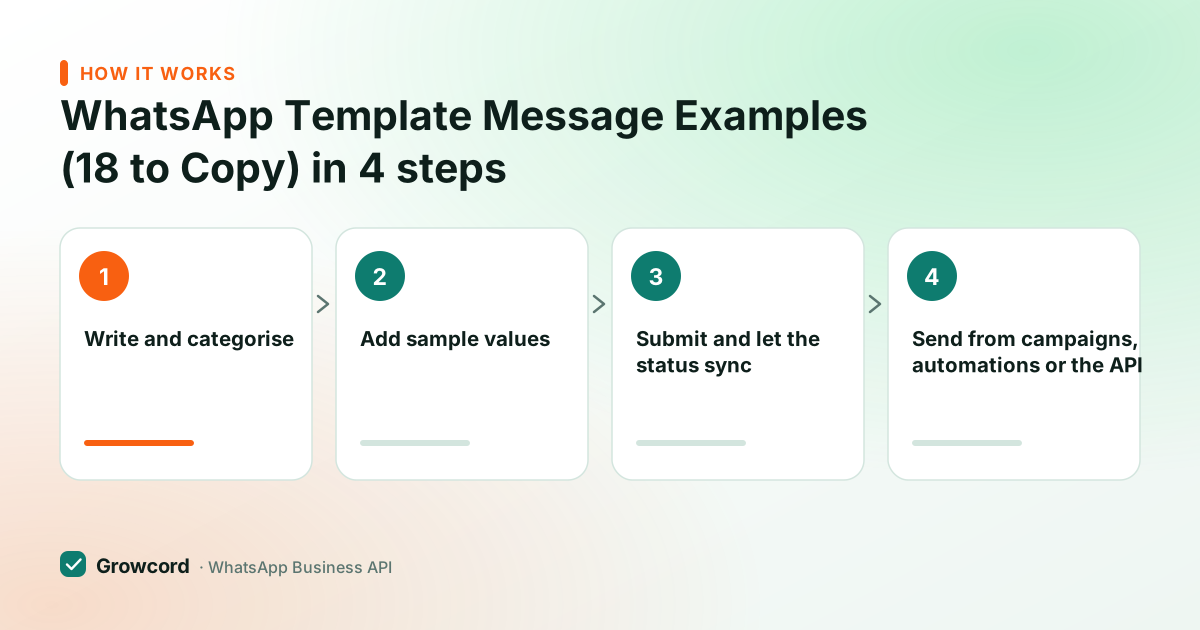
Submitting these from Growcord
Write and categorise
Paste the copy into the template editor, pick the language and the honest category, and add a header, footer or buttons if the message needs them.
Add sample values
Fill realistic examples for each variable, a real-looking name, order number and amount. Reviewers approve faster when the sample reads like a genuine message.
Submit and let the status sync
Growcord submits to Meta and syncs the approval status back automatically. Most templates return approved within minutes to a few hours.
Send from campaigns, automations or the API
Approved templates become available in broadcasts, ecommerce automations and the REST API, with contact fields mapped to the variables.
Get these templates approved on your number this week
Free tier includes 50 conversations a month, enough to submit templates and test them on real customers before paying anything.
Start free, no card neededWhy Growcord
What you get here that you don't get elsewhere
Frequently asked questions
What is a WhatsApp template message with an example?
It's a pre-approved message format used to start conversations from the business side, with numbered variables for personalisation. Example: "Hi {{1}}, your order {{2}} is confirmed. Total: ₹{{3}}. We'll message you when it ships." You submit it to Meta once; after approval you can send it to any opted-in contact, with each customer's name and order details merged in.
How do I write a template that gets approved?
Label the category honestly, keep variables surrounded by static text, provide realistic sample values, use full URLs instead of shorteners, and add an opt-out line to marketing copy. Avoid asking for sensitive data like card numbers or OTPs. Templates written this way are routinely approved within minutes to a few hours as of August 2026.
Why was my WhatsApp template rejected?
The most common cause is a category mismatch, promotional wording submitted as utility. Other frequent reasons: placeholder-heavy copy, missing sample values, shortened links, banned content, or formatting that reads as spam. Fix the specific issue and resubmit; there's no penalty for a rejection, and a reworded version often passes the same day.
Can template messages include images and buttons?
Yes. Headers can carry an image, video or PDF, and templates support buttons, quick replies for one-tap answers like Confirm or Reschedule, plus link and phone-number buttons. Media templates go through the same review as text ones. Buttons are worth the setup: taps and replies are measurable, and a reply opens a free 24-hour service window.
How long does WhatsApp template approval take?
Usually minutes to a few hours as of August 2026; occasionally up to 24 hours when a template goes to deeper review. Growcord syncs the status automatically, so you'll see approved, rejected or paused against each template without checking Meta's business manager yourself.
Can I edit a template after it's approved?
Yes, but the edit goes back through review before the new version can be sent, and Meta limits how often a template can be edited in a short span. In practice most teams keep several approved variants, a festival version, a plain version, and pick per campaign rather than editing one template repeatedly.
Why businesses pick Growcord
Official WhatsApp Business API
Built on Meta's Cloud API, the sanctioned channel, not a modded app. No number-ban roulette.
Indian pricing, GST invoice
Plans from ₹99/month billed yearly. Paid in ₹ via Razorpay, with a proper GST invoice every time.
Free tier, no card needed
1 number and 50 conversations a month to prove it on real customers before paying anything.
Support from New Delhi, in IST
A real team on email and WhatsApp, Monday to Saturday 10:00–19:00 IST, not a ticket void.
Talk to us
Get set up on WhatsApp this week
Tell us what you sell and how many customers you message. We'll reply on WhatsApp with the plan that fits and, if you want it, walk you through the Meta approval step.
- No sales call unless you ask for one
- Answers from the team that builds it, in IST hours
- Free tier available. You can start before you decide
Keep reading
Related guides and comparisons
Last updated: 2026-08-07