

WhatsApp API requirements and documents
The list of what you actually need is shorter than most "requirements" articles suggest. As of August 2026, Meta's embedded signup asks for four things:
- A phone number that isn't on WhatsApp. The API and the WhatsApp apps can't share a number. You can use a fresh SIM, a landline (verification comes by voice call), or a virtual number, or migrate your existing WhatsApp Business app number, which deletes it from the app first. Many businesses keep their known number on the app and put a new number on the API while they test.
- A Facebook account to log in with, and a Meta Business Portfolio (the thing formerly called Business Manager). If you don't have one, the signup flow creates it for you in about a minute.
- Your business details, legal name, address, category. A website isn't mandatory for basic access, but Meta's checks go smoother when your business has some public footprint: a website, a Google Business listing, or an active social page.
- A display name that follows Meta's rules: it should match or clearly relate to your real business name. "Sharma Jewellers" passes; "Best Gold Offers" doesn't.
No GST certificate, no incorporation papers, no signed forms, for basic access. Documents enter the picture only for business verification, an optional Meta review that lifts your messaging limits faster and is a prerequisite for the green tick.
For that you'd submit proof the business legally exists, a certificate of incorporation, GST registration, or Udyam certificate, plus something tying the business to its address or phone, like a utility bill. Your website footer showing the same legal name helps the reviewer connect the dots.
One eligibility note: Meta's commerce policy bars some industries from the platform, gambling, alcohol, tobacco, weapons, adult content, and a few others. If your business sells restricted goods, the account gets rejected or banned later, so check the policy before spending time on setup.
Keep these ready before you start
A phone number not currently registered on any WhatsApp app
A Facebook account you control (personal login is fine)
Your legal business name and address, as written on official records
A display name that matches or clearly relates to the business name
Access to the phone for the OTP or verification call
Optional, for verification later: GST/Udyam/incorporation document and a website listing the legal name
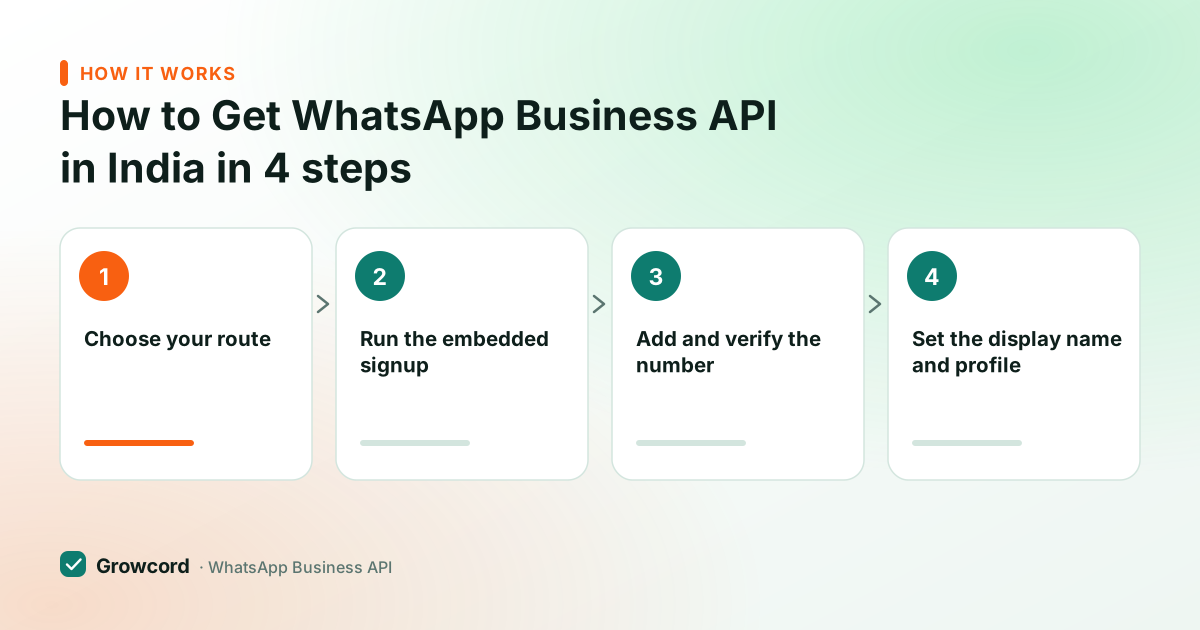
The signup, from zero to first message
Choose your route
Sign up direct with Meta (you build your own sending tools) or through a platform on the Cloud API like Growcord (dashboard, inbox, campaigns included). Either way it's the same official API underneath.
Run the embedded signup
From Growcord, click Connect WhatsApp. A Meta popup walks you through logging in with Facebook, picking or creating your Business Portfolio, and creating the WhatsApp Business Account (WABA).
Add and verify the number
Enter the phone number and confirm it with the OTP (SMS or voice call). This is the step that permanently links the number to the API.
Set the display name and profile
Add your business name, logo, address, hours and description. Display names that follow the naming rules are usually accepted immediately.
Create a template and send
Business-initiated messages use Meta-approved templates. Write one, submit it from the dashboard, and send your first message once it's approved, often within the hour.
How long WhatsApp API setup takes
The honest timeline, as of August 2026: the embedded signup itself takes 10–15 minutes. The number is usually live for sending the same day. Template approvals typically come back in minutes to a few hours. Business verification, if you apply for it, takes anywhere from a couple of days to two weeks depending on how cleanly your documents match your business details.
Two things gate you early on. First, messaging limits: a brand-new number can be held to around 250 unique customers per day until Meta's initial checks complete, then moves to 1,000, and the tier grows automatically as you send with good quality, the messaging limits guide explains how tiers climb to 10,000 and beyond. Second, templates: until your first templates are approved you can only reply to customers who message you first, inside the 24-hour window.
Apply for WhatsApp API direct with Meta, or through a platform?
Going direct to Meta's Cloud API costs nothing for access, but you get an API and nothing else, no inbox, no campaign screen, no template editor, no team logins. It's the right choice if you're a developer building messaging into your own product; our Cloud API vs BSP comparison covers that decision properly.
Going through a platform gets you the working tools on day one. Growcord's free tier includes one number and 50 conversations a month, enough to complete setup and test real messages before paying anything.
Paid plans start at ₹299/month (₹99/month billed yearly), and Meta's per-message fees are passed through as credits at Meta's published rate with no markup added; the pricing page lays every plan out, and subscriptions carry a 7-day money-back guarantee. Whichever route you pick, be wary of anyone selling "WhatsApp API" that involves scanning a QR code with your phone, that's an unofficial gateway riding on WhatsApp Web, and it's how numbers get banned.
Connect your number this afternoon
Free tier: one number and 50 conversations a month. The embedded signup takes about 15 minutes end to end.
Start free, no card neededWhy Growcord
What you get here that you don't get elsewhere
Frequently asked questions
Is the WhatsApp Business API free to get?
Access itself costs nothing, Meta doesn't charge a signup or licence fee for the Cloud API. What you pay for is usage: Meta charges per delivered template message (marketing messages in India are about ₹0.86 as of August 2026), and platforms charge a subscription for the tools. Growcord is free to start with 50 conversations a month; Meta's fees apply once you message at scale.
Can I use my existing WhatsApp number for the API?
Yes, but the number can only live in one place. Migrating your WhatsApp Business app number to the API deletes it from the app, chats don't carry over, so export anything you need first. Many businesses put a new number on the API and keep the old one running until the switch is proven.
What documents do I need for WhatsApp Business API?
For basic access: none. The signup needs a Facebook login, a phone number and your business details. Documents are only needed for optional business verification, typically a GST registration, Udyam certificate or certificate of incorporation, plus something like a utility bill. Verification lifts messaging limits faster and is required before applying for the green tick.
How long does WhatsApp API approval take?
The signup itself isn't an approval process, most numbers are live the same day. Display names that follow the naming rules are accepted almost immediately, and template approvals usually return within minutes to a few hours as of August 2026. The only genuinely slow piece is optional business verification, which can take from two days to two weeks.
Do I need a website to get the WhatsApp API?
Not strictly, Meta's embedded signup completes without one. A website (or an established Google Business or social profile) mainly matters for business verification and the green tick, where reviewers want public evidence the business is real and the legal name matches. If you have a site, put your legal business name in the footer before applying.
Do I need a developer to set this up?
No, if you use a platform: Growcord's connect flow is click-through, and campaigns, templates and the inbox all work from a dashboard with nothing to code. You'd only need a developer for the direct Cloud API route, or if you want to integrate WhatsApp into your own software using the REST API and webhooks.
Why businesses pick Growcord
Official WhatsApp Business API
Built on Meta's Cloud API, the sanctioned channel, not a modded app. No number-ban roulette.
Indian pricing, GST invoice
Plans from ₹99/month billed yearly. Paid in ₹ via Razorpay, with a proper GST invoice every time.
Free tier, no card needed
1 number and 50 conversations a month to prove it on real customers before paying anything.
Support from New Delhi, in IST
A real team on email and WhatsApp, Monday to Saturday 10:00–19:00 IST, not a ticket void.
Talk to us
Get set up on WhatsApp this week
Tell us what you sell and how many customers you message. We'll reply on WhatsApp with the plan that fits and, if you want it, walk you through the Meta approval step.
- No sales call unless you ask for one
- Answers from the team that builds it, in IST hours
- Free tier available. You can start before you decide
Keep reading
Related guides and comparisons
Last updated: 2026-08-07