

Where the profile lives, and why it matters more than you think
Your business profile is the page a customer sees when they tap your name in a chat. For most Indian buyers it is the first trust check: an unknown number with no photo, no description and no address reads as spam, and spam gets blocked.
Blocks feed WhatsApp's quality systems, so a thin profile doesn't just cost you replies, over time it can cost you delivery. Filling in every field is the cheapest reputation work you will ever do.
There are two places to set it up, depending on which product your number runs on:
- WhatsApp Business app (free, one phone): Settings → Business tools → Business profile. You edit everything on the phone.
- WhatsApp Business API (for teams and automation): the same fields are edited in Meta's WhatsApp Manager or from your platform's dashboard. The important extra is the display name, the name shown to customers, which Meta reviews against its naming rules before approving.
If you're deciding between the two products, our Business app vs API comparison covers when each makes sense. The profile advice below applies to both.
Every profile field, with limits
Meta caps each field, and the caps shape what you should write. The limits below are Meta's documented values as of August 2026, they change rarely, but check the in-product counter if a save fails.
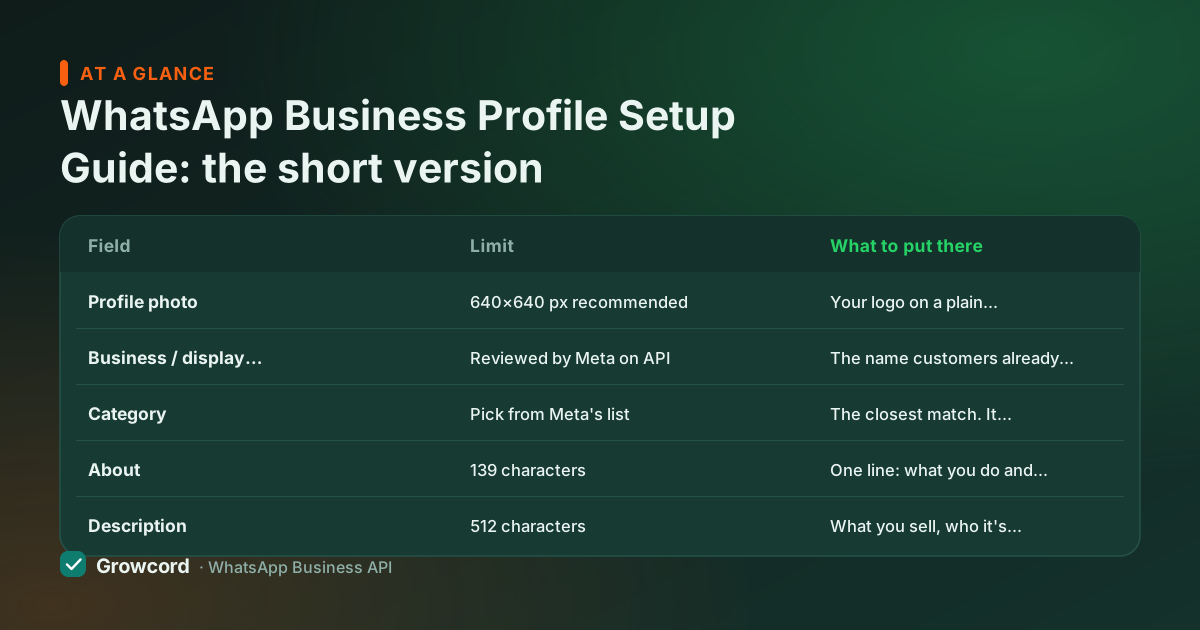
Profile fields and their limits
| Field | Limit | What to put there |
|---|---|---|
Profile photo | 640×640 px recommended | Your logo on a plain background. It renders small in chat lists, so avoid fine text. |
Business / display name | Reviewed by Meta on API | The name customers already know from your board, bills or website. No taglines, no extra keywords. |
Category | Pick from Meta's list | The closest match. It shows publicly under your name. |
About | 139 characters | One line: what you do and where. Shows in some surfaces next to your name. |
Description | 512 characters | What you sell, who it's for, service area, and what to do next ("Message us for today's rates"). |
Address | 256 characters | Full street address for walk-in businesses; city and state at minimum for online ones. |
128 characters | A monitored inbox, not a personal Gmail if you can avoid it. | |
Websites | 2 links, 256 characters each | Your site and one deep link, store, booking page or Instagram. |
Business hours | Per day, or 'always open' | Your real hours. Customers see them, so back them with an after-hours auto-reply. |
Field limits per Meta's Business Platform documentation, checked August 2026.
Setting up the profile, step by step
Add the photo and confirm the name
Upload a square logo (640×640 works everywhere). On the app the name locks after setup and changes are limited; on the API a display name change goes back through Meta review, so get it right once.
Write the description for a stranger
Assume the reader has never heard of you. State what you sell, the area you serve, and one action: "Ladies' ethnic wear, sizes S–3XL. Surat, India-wide shipping. Message us for the new catalog."
Fill hours, address and links
Set real working hours, customers can see them, and pairing them with an auto-reply for after-hours messages keeps expectations honest. Add your website and one deep link that matches why people message you.
Connect a catalog if you sell products
Add items with a clear photo, price in rupees and a short description. Customers can browse it from your profile without you sending a single message.
Check it from a customer's phone
Message your number from a phone that hasn't saved you, tap the name, and read the profile cold. Whatever confuses you will confuse buyers.
How to optimize your WhatsApp Business profile
A complete profile is the floor. To optimize your WhatsApp Business profile, work on the three things customers actually judge:
Consistency with the rest of your presence. The name, logo and description should match your website, Google Business Profile and Instagram exactly. Mismatches read as fake, and if you later apply for the green tick, Meta checks this consistency too.
A description that answers the first question. Most first messages are a variant of "price?", "location?" or "do you have X?". A description that pre-answers the most common one saves a round trip: a coaching institute that lists its courses and batch timings gets better-qualified enquiries than one that says "quality education since 1995".
Signals that you reply. Verified hours, a catalog with current prices, and a fast first response (an auto-reply covers nights and Sundays) tell a customer this number is alive. Dead profiles train people to call instead, which defeats the point of being on WhatsApp.
The business profile catalog
The catalog is part of your profile, and it works harder than most businesses expect. Items appear under a Catalog tab on the profile; customers can browse, tap an item and message you about it with the product attached, so the conversation starts with context instead of "which one, sir?".
Keep it honest and current: real photos (1024×1024 or larger squares look best), prices in ₹ that match what you actually charge, and stock you actually have. Catalog items are checked against Meta's Commerce Policy, so listings for prohibited categories get rejected. Our WhatsApp catalog guide covers setup in detail, and the selling on WhatsApp guide covers the full order-to-payment flow.
One thing the profile can't do: the green badge. A complete profile does not grant the green tick, that's a separate Meta Verified application with its own requirements, explained in our green tick guide.
Once the profile is solid, make it easy to reach: a click-to-chat link in your Instagram bio and a QR code at the counter both open a chat with your freshly polished profile one tap away.
And if you're setting up on the API, platforms like Growcord let you edit all of these fields from the dashboard and sync them to Meta, see the pricing page for plans, which start at ₹299/month, or ₹99/month billed yearly.
The WhatsApp profile checklist
Square logo uploaded (640×640), recognisable at thumbnail size
Business name matches your website, signage and GST invoices
Category chosen, the closest real match, not the grandest one
Description states product, audience, area and one next step
Working hours set and true; after-hours auto-reply configured
Address complete (or city + state for online-only businesses)
Website plus one deep link (store, booking page or Instagram)
Catalog live with current prices in ₹ and in-stock items only
Profile reviewed from a phone that hasn't saved your number
Set up your profile once, then put a team behind it
Growcord runs on the official WhatsApp API, profile fields, templates, a shared inbox and automations in one dashboard. Free tier: 1 number and 50 conversations a month.
Start free, no card neededWhy Growcord
What you get here that you don't get elsewhere
Frequently asked questions
How do I set up a business profile on WhatsApp?
In the WhatsApp Business app, go to Settings → Business tools → Business profile and fill in the photo, name, category, description, address, hours and website. On the WhatsApp Business API, the same fields are edited in Meta's WhatsApp Manager or your platform's dashboard, and the display name goes through a short Meta review.
What size should the WhatsApp Business profile photo be?
Upload a 640×640 pixel square. That is the size WhatsApp stores, though it renders far smaller in a chat list. Use your logo on a plain background, crop tight so the mark fills the circle, and leave out taglines or phone numbers: any text under about 20 pixels tall is unreadable at thumbnail size, which is where most customers will actually see it.
Can I change my business name on WhatsApp later?
Yes, but with friction. The Business app limits how often you can change the name. On the API, the display name is reviewed by Meta against its naming rules. It must represent your real business and can't be a generic keyword string, so a change takes a fresh review rather than an instant edit.
Does completing my profile give me the green tick?
No. The badge is a separate Official Business Account request that needs a WhatsApp Business API account, completed Meta business verification and, the part that decides most cases, organic press coverage of your brand. A complete profile helps the reviewer see a real business, but it grants nothing on its own. Our green tick guide covers the full application.
What should I write in the WhatsApp business description?
In up to 512 characters: what you sell, who it's for, where you operate, and what the customer should do next. Example: "Homemade snacks and sweets, Indore. Bulk orders for functions welcome. Message us for this week's menu." Skip slogans, answer the questions people actually message you with.
Can customers see my business profile before I message them?
Yes, whenever they open your contact page, from a click-to-chat link, a QR scan, a group, or a message you've sent. That's why the profile matters for cold reach: it's your landing page inside WhatsApp, seen before anyone decides to reply.
Why businesses pick Growcord
Official WhatsApp Business API
Built on Meta's Cloud API, the sanctioned channel, not a modded app. No number-ban roulette.
Indian pricing, GST invoice
Plans from ₹99/month billed yearly. Paid in ₹ via Razorpay, with a proper GST invoice every time.
Free tier, no card needed
1 number and 50 conversations a month to prove it on real customers before paying anything.
Support from New Delhi, in IST
A real team on email and WhatsApp, Monday to Saturday 10:00–19:00 IST, not a ticket void.
Talk to us
Get set up on WhatsApp this week
Tell us what you sell and how many customers you message. We'll reply on WhatsApp with the plan that fits and, if you want it, walk you through the Meta approval step.
- No sales call unless you ask for one
- Answers from the team that builds it, in IST hours
- Free tier available. You can start before you decide
Keep reading
Related guides and comparisons
Last updated: 2026-08-07