

The wa.me link format, exactly
The rules are strict and the errors are always the same ones. The number must be in full international format with digits only: country code first, then the number, no plus sign, no spaces, no dashes, no brackets, and no leading zero. For an Indian mobile 98765 43210, the link is:
https://wa.me/919876543210
Common mistakes that silently break the link: writing +91 (the plus must go), keeping the leading 0 from the domestic format (0919876... fails), and pasting the number with spaces.
When a visitor taps a correct link, WhatsApp opens, the app on mobile, WhatsApp Web or the desktop app on a computer, with a chat window for your number and your business profile one tap away. If they don't have WhatsApp installed, they land on a page prompting them to get it.
There's also a longer legacy form, https://api.whatsapp.com/send?phone=919876543210, which behaves the same way. Use wa.me, it's shorter, official and what Meta documents (checked August 2026).
Adding a pre-filled message to your link
Append ?text= with the message URL-encoded, spaces become %20, and other special characters have their own codes:
https://wa.me/919876543210?text=Hi%2C%20I%20want%20the%20price%20list
opens a chat with "Hi, I want the price list" already typed. Three practical rules. Keep it short, one line the customer would plausibly say, not a paragraph of marketing.
Treat it as plain text, bold and emoji support in pre-filled text is inconsistent across devices. And remember the customer can edit or delete it before sending; the link never sends anything by itself, which is exactly why click-to-chat is consent-clean.
The pre-filled message is also your free analytics. Give every placement its own text "Hi! Saw your Diwali offer on Instagram" for the bio link, "Hi, I'd like to reorder" for the invoice QR, and the first message tells you where each lead came from. Pair that with keyword-based auto-replies or a chatbot and each entry point can get its own instant response.
Every WhatsApp link format that works
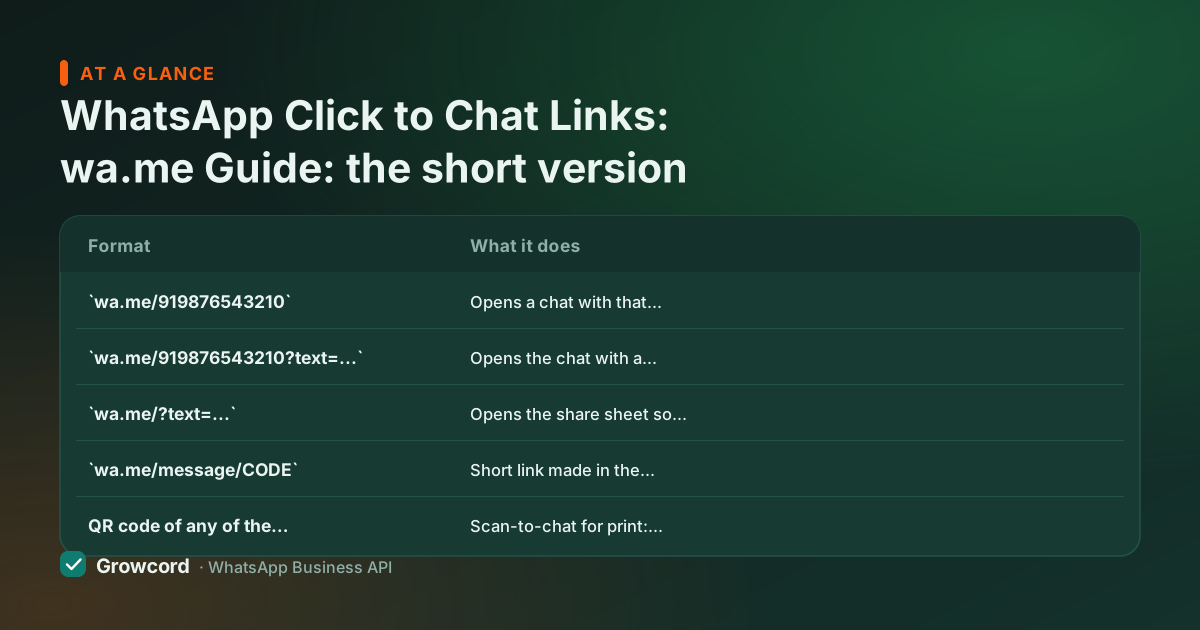
| Format | What it does |
|---|---|
| Opens a chat with that number. The standard click to chat link. |
| Opens the chat with a URL-encoded message pre-filled. The visitor edits or sends it. |
| Opens the share sheet so the visitor picks a contact. Good for share buttons, not lead capture. |
| Short link made in the WhatsApp Business app (Business tools → Short link), with an optional greeting. |
QR code of any of the above | Scan-to-chat for print: packaging, visiting cards, shop counters, hoardings. |
Formats per Meta's click-to-chat documentation, checked August 2026.
Build and test your link in two minutes
Write the number digits-only
Country code plus number: 919876543210 for an Indian mobile. Strip the +, spaces and any leading zero.
Add the pre-filled message
Decide the one line you want leads to open with, URL-encode it (a free tool like our WhatsApp link generator does this for you) and append it as ?text=.
Test on mobile and desktop
Tap it from a phone that hasn't saved your number and click it from a laptop. Check the right chat opens and the text appears intact.
Make a QR for offline placements
Convert the same link into a QR code for bills, packaging and the shop counter, scanning opens the identical pre-filled chat.
Where to put your WhatsApp link, Instagram bio and beyond
Instagram bio is the highest-value placement for most Indian businesses: Instagram makes bio links tappable, so a wa.me link converts profile visitors into open chats directly. Use a pre-filled message that references Instagram so you know the source. The same link works in Facebook page buttons, YouTube descriptions, and your Google Business Profile.
Your website deserves more than a bare link, a floating WhatsApp chat button stays in view the whole scroll, which a footer link never does. Email signatures and invoices quietly move existing customers onto WhatsApp, where your next order update or payment reminder actually gets read. Print, visiting cards, menu cards, packaging inserts, exhibition standees, works through QR codes of the same link; a customer holding your product is seconds from a reorder chat.
Two honest limitations. First, wa.me links carry no click tracking. WhatsApp gives you no analytics on taps. Distinct pre-filled messages per placement are the practical workaround, or route the link through your own short-domain redirect if you need hard click counts. Second, a link is only as good as what happens after the tap: if messages sit unanswered for hours, the placement was wasted.
That's the point where businesses move from one phone to the WhatsApp Business API, a shared team inbox, auto-replies and bots answering every entry point. Growcord's free tier (1 number, 50 conversations a month) is enough to test that whole flow; pricing has the paid plans, starting at ₹299/month or ₹99/month billed yearly.
Try the free WhatsApp link generator and QR code generator on this site, both build the formats above with correct encoding, no signup needed.
Put a team behind every link you place
Click-to-chat leads land in Growcord's shared inbox, get an instant auto-reply, and never sit unread. Free to start on the official WhatsApp API.
Start free, no card neededWhy Growcord
What you get here that you don't get elsewhere
Frequently asked questions
What is the wa.me link format for an Indian number?
https://wa.me/91 followed by the 10-digit mobile number, for a number like 98765 43210, that is https://wa.me/919876543210. Digits only: no plus sign, no spaces, no dashes, and drop the leading zero from the domestic format. The 91 country code is required even when every customer is in India, and a link missing it opens the wrong chat or none at all.
How do I add a pre-filled message to a WhatsApp link?
Append ?text= followed by your URL-encoded message: https://wa.me/919876543210?text=Hi%20there pre-fills "Hi there". Spaces become %20 and special characters need their own codes, so use a link generator to avoid encoding mistakes. The visitor can edit the text and must still press send.
Do click to chat links work if the person hasn't saved my number?
Yes, that's the main point. Tapping the link opens a chat with your number immediately, with no saving step on either side. On a phone it opens the app; on a computer it opens WhatsApp Web or the desktop app.
Can I put a WhatsApp link in my Instagram bio?
Yes, and it's one of the best placements available. Paste the full wa.me link into the bio's website field, Instagram makes it tappable. Use a pre-filled message that mentions Instagram ("Hi! Saw your page on Instagram") so you know which leads the bio produced.
Can I track clicks on a wa.me link?
Not directly, WhatsApp provides no click analytics for wa.me links. The two workarounds: give each placement a distinct pre-filled message so the first message reveals the source, or route the link through your own redirect/short link and count clicks there before forwarding to wa.me.
Is wa.me free and official?
Yes on both counts. The wa.me domain is operated by WhatsApp itself and documented by Meta as the click-to-chat format. Creating and sharing the links costs nothing, in any quantity, you only ever pay WhatsApp anything if you use the Business API for outbound messaging.
Why businesses pick Growcord
Official WhatsApp Business API
Built on Meta's Cloud API, the sanctioned channel, not a modded app. No number-ban roulette.
Indian pricing, GST invoice
Plans from ₹99/month billed yearly. Paid in ₹ via Razorpay, with a proper GST invoice every time.
Free tier, no card needed
1 number and 50 conversations a month to prove it on real customers before paying anything.
Support from New Delhi, in IST
A real team on email and WhatsApp, Monday to Saturday 10:00–19:00 IST, not a ticket void.
Talk to us
Get set up on WhatsApp this week
Tell us what you sell and how many customers you message. We'll reply on WhatsApp with the plan that fits and, if you want it, walk you through the Meta approval step.
- No sales call unless you ask for one
- Answers from the team that builds it, in IST hours
- Free tier available. You can start before you decide
Keep reading
Related guides and comparisons
Last updated: 2026-08-07