

Why send weekly updates to customers on WhatsApp
Email newsletters are cheap to send and easy to ignore. Typical open rates sit somewhere in the twenties, and in India, where plenty of your customers live on a phone and rarely open a laptop inbox, the real attention share is lower still.
A WhatsApp newsletter flips the equation: it costs more per send, and it earns far more attention per send. That trade shapes everything about doing it well. You keep the list smaller and cleaner, you send less often, and every issue has to be worth the interruption.
The second difference is that WhatsApp is two-way. When a subscriber replies to your Friday offers message "is the blue one still available?", that reply lands in your team inbox as a live conversation, and a sale can close in the same thread. An email newsletter ends at the open; a WhatsApp newsletter starts conversations. The WhatsApp vs SMS vs email page puts the channel numbers side by side.
Subscriber broadcasts vs WhatsApp Channels
People searching for a WhatsApp newsletter often find WhatsApp Channels and wonder which they need. A Channel is a public one-way feed that lives in the Updates tab: followers browse it when they remember to, you can't personalise per subscriber, and there's no API-level automation or per-recipient delivery data.
A subscriber broadcast through the Business API arrives in each person's private chat list under your business name, supports merge fields (name, city, last order), and reports delivered and read counts per issue. For a business newsletter that's meant to drive replies and orders, broadcasts are the tool; the broadcast software page covers the machinery.
Email newsletter vs WhatsApp newsletter, honestly
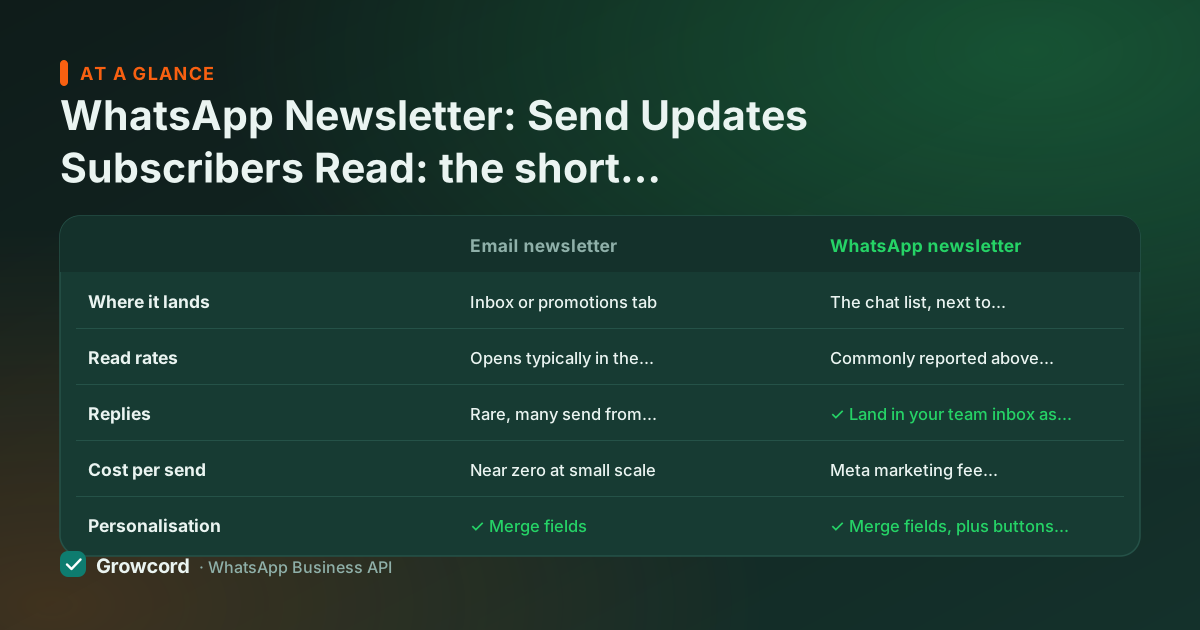
| Email newsletter | WhatsApp newsletter | |
|---|---|---|
Where it lands | Inbox or promotions tab | The chat list, next to family and friends |
Read rates | Opens typically in the twenties | Commonly reported above 90% |
Replies | Rare, many send from no-reply addresses | ✓ Land in your team inbox as live conversations |
Cost per send | Near zero at small scale | Meta marketing fee, roughly ₹0.78–0.88 per conversation in India |
Personalisation | ✓ Merge fields | ✓ Merge fields, plus buttons and media |
Unsubscribe | Footer link | Reply STOP, and you honour it immediately |
Both channels have a place. WhatsApp costs more per send and earns far more attention, which is why the list must be genuinely opt-in.
Launching your newsletter
Collect real opt-ins
A checkout checkbox, a 'reply NEWS to subscribe' keyword, a QR at the billing counter, a link in your Instagram bio. Consent first, it's what keeps read rates high and your number safe.
Design the template
Write the issue format once, image or PDF, short text with merge fields, a button to shop or reply, and submit it to Meta from inside Growcord. Approval usually takes minutes to a few hours.
Pick a cadence and schedule
Weekly or fortnightly beats daily for almost everyone. Schedule the send for when your customers are free, Sunday morning works for retail, and review the credit estimate before confirming.
Read the report, prune the list
Delivered, read and replied counts per issue. Subscribers who never read in months get a win-back message or come off the list, a smaller list that reads beats a big one that blocks.
What to put in it: content that survives the chat list
The newsletters that keep their subscribers are useful before they're promotional. A kirana store sends the week's price list and fresh arrivals every Saturday. A jeweller sends the day's gold rate with one featured piece.
A coaching institute sends a weekly practice question with the answer coming next issue. A D2C brand alternates drops with styling tips. The pattern: lead with something the reader wants even when they're not buying, and let the offer ride along. The marketing ideas guide has a longer list tuned to Indian retail rhythms.
Respect is the retention strategy. Every issue should carry an obvious way out ("reply STOP to unsubscribe"), and you honour it instantly, not just for courtesy, but because ignored opt-outs turn into blocks, and blocks drag down the quality rating that controls your messaging limits. The opt-in guide covers consent formats that hold up.
What a WhatsApp newsletter tool costs
Two lines on the bill. Growcord's plan fee starts at ₹299/month, ₹99/month billed yearly, with 200 conversations included; Startup at ₹799/month (₹399 yearly) includes 1,000 conversations plus scheduling and analytics, and 1,000 extra conversations cost ₹399. On top, Meta charges a marketing-conversation fee of roughly ₹0.78–0.88 per subscriber per issue in India, billed as credits at cost.
Worked example: a 500-subscriber weekly newsletter is about 2,000 sends a month, roughly ₹1,700 in Meta fees, plus Startup at ₹399 and one ₹399 conversation add-on to lift the allowance from 1,000 to 2,000. Call it ₹2,500 a month for four issues to 500 people who read them. That's real money, which is exactly why the format works: nobody spams a channel that costs per send, and subscribers can tell. The pricing page has all plans and worked examples.
Send issue #1 to your first fifty subscribers
The free tier covers 1 number and 50 conversations a month, enough to prove the format before paying anything.
Start free, no card neededWhy Growcord
What you get here that you don't get elsewhere
Frequently asked questions
What is a WhatsApp newsletter?
It's a recurring broadcast, weekly offers, updates, tips, sent to customers who opted in, delivered to each subscriber as a normal private chat through the official WhatsApp Business API. Unlike an email newsletter it's two-way: subscribers can reply, and those replies land in your inbox as live conversations.
Is a WhatsApp newsletter the same as a WhatsApp Channel?
No. A Channel is a public one-way feed in the Updates tab with no per-subscriber personalisation, no per-recipient delivery data and no API automation. A newsletter broadcast arrives in each subscriber's private chat list, supports merge fields, buttons and media, and reports delivered and read counts per issue. For driving replies and orders, broadcasts are the better tool.
How do people subscribe to a WhatsApp newsletter?
Through any opt-in you can put in front of them: a checkbox at checkout, a keyword like 'reply NEWS to subscribe' answered by an auto-reply, a QR code at the billing counter, or a wa.me link in your bio and email footer. Consent is required by Meta's policies for marketing messages, and it's also what keeps your read rates high.
How much does it cost to send a WhatsApp newsletter?
Plan fee plus Meta's per-conversation charges. On Growcord, plans start at ₹299/month (₹99/month billed yearly), and a marketing conversation in India runs roughly ₹0.78–0.88. A weekly issue to 500 subscribers works out to about ₹1,700 a month in Meta fees. The exact credit estimate shows before every send.
How often should I send a WhatsApp newsletter?
Weekly or fortnightly for most businesses. WhatsApp is a personal space, so daily promotional sends burn goodwill fast, rising blocks hurt the quality rating that controls your messaging limits. A useful weekly issue at a consistent time (say, Saturday 11 am) builds a habit; more than that should be earned by genuinely time-sensitive content.
Will sending a newsletter get my number blocked or banned?
Not if the list opted in and can opt out. Bans and rating drops come from messaging people who never asked. Send through the official API with approved templates, include 'reply STOP' in every issue, honour opt-outs immediately, and prune subscribers who never read. Do that and the newsletter strengthens your number's standing rather than risking it.
Why businesses pick Growcord
Official WhatsApp Business API
Built on Meta's Cloud API, the sanctioned channel, not a modded app. No number-ban roulette.
Indian pricing, GST invoice
Plans from ₹99/month billed yearly. Paid in ₹ via Razorpay, with a proper GST invoice every time.
Free tier, no card needed
1 number and 50 conversations a month to prove it on real customers before paying anything.
Support from New Delhi, in IST
A real team on email and WhatsApp, Monday to Saturday 10:00–19:00 IST, not a ticket void.
Talk to us
Get set up on WhatsApp this week
Tell us what you sell and how many customers you message. We'll reply on WhatsApp with the plan that fits and, if you want it, walk you through the Meta approval step.
- No sales call unless you ask for one
- Answers from the team that builds it, in IST hours
- Free tier available. You can start before you decide
Keep reading
Related guides and comparisons
Last updated: 2026-08-07